



如果要製作 Webtoon,但在大型畫布上工作,此腳本將説明您順利地將其剪切為 800px,由 1280px 程式碼片段將其轉換為 1280px 片段,用於在 webtoon 上上傳。 If you want to make a webtoon but you work on a large canvas, this script will help you cut it smoothly into 800px by 1280px snippets for uploading on webtoon.
1. 轉到編輯>更改畫布大小以查看原始畫布的大小,並記錄以圖元為單位的高度。(我的是 1600 x 13134)

2. 接下來,按一下選擇大小/剪切 1,並保存為 pg 1,無論您在追蹤檔案的位置。
*如果畫布的寬度已經為 800px,請改為在下拉清單中按一下更改畫布大小(如果從 1600px 開始,這將跳過圖像解析度調整)
*如果您從任何其他寬度畫布開始,請更改圖像解析度,使寬度為 1600 或 800 第一,並按照上面的注釋

3. 更改畫布高度,以便顯示整個條帶。由於我原來的條帶是 1600 x 13134, 我們改變了解析度, 以便這將是 800px 寬度, 我將使高度 6567px = 13134 (og 高度)/(1600 (og 寬度)/800)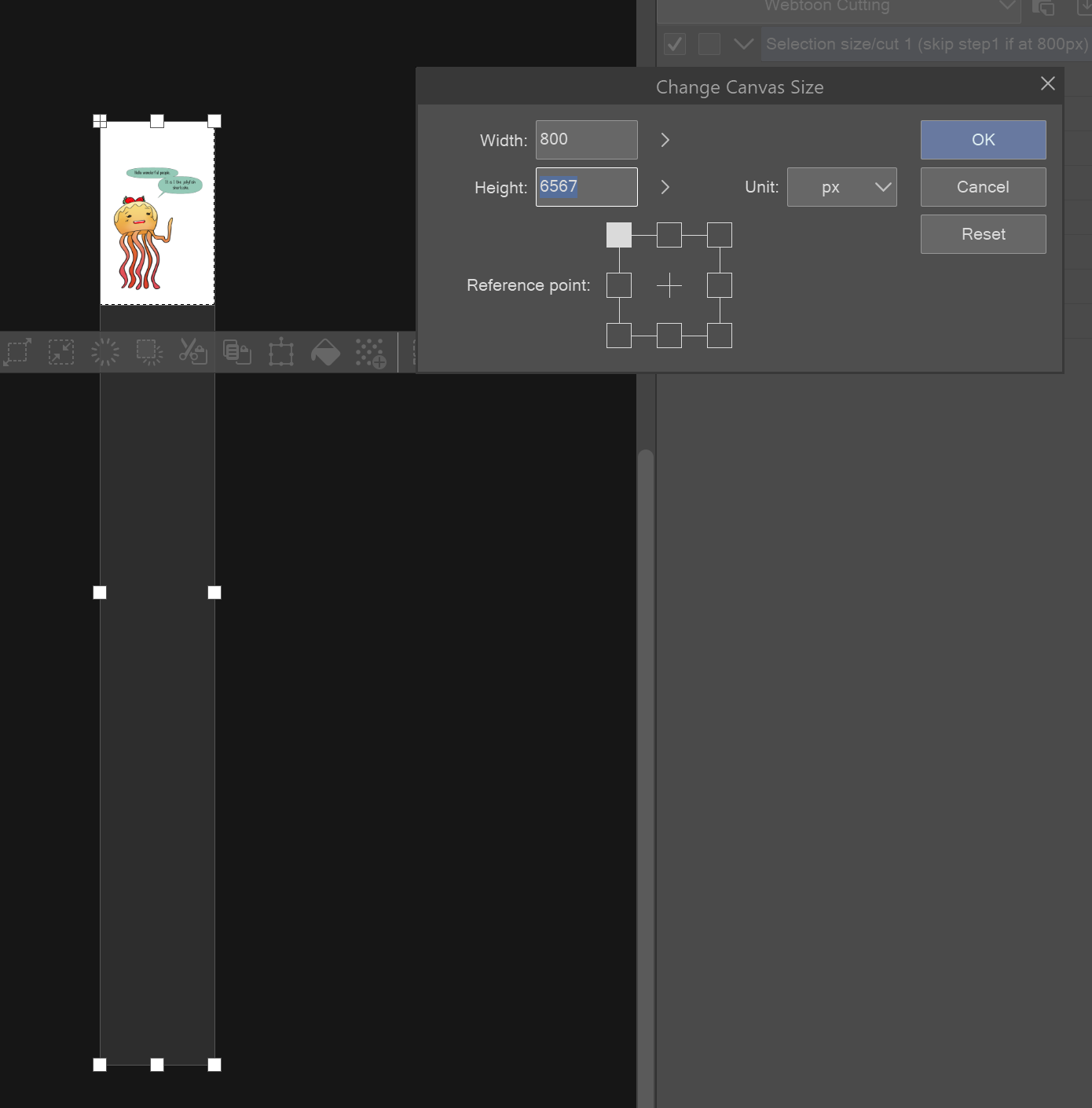
*注意:確保您已為此選擇了頂部盒之一,以正確工作
4. 按一下移動 n 剪切,保存 png,按一下撤銷,然後再次按一下移動 n 剪切,然後繼續重複,直到將整個條帶保存為 pngs/頁

5. 恭喜你!您的網路湯已準備好上傳!:)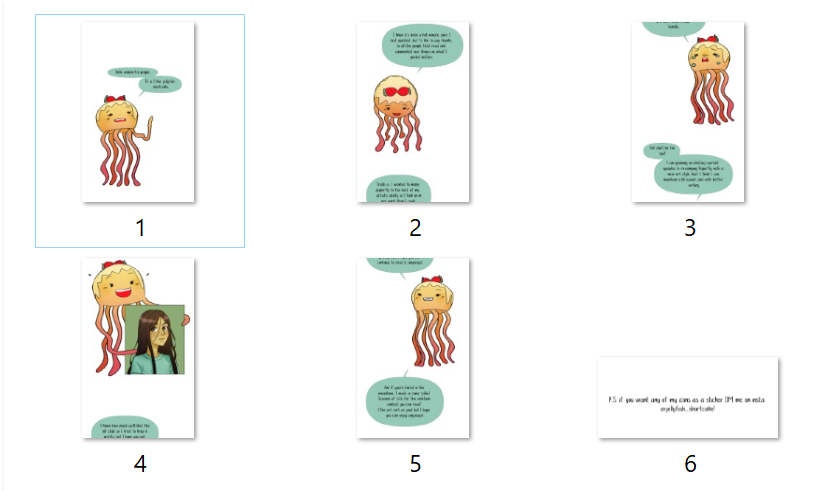
*確保不會意外地將其保存在較小的尺寸,否則您將丟失原始圖像品質!
----------------------------------
堵塞自己:
@jellyfish_shortcake在 Instagram &
看看我的漫畫叫 Paperfly 在網路畫布上!
1. Go to edit>change canvas size to see how large the original canvas is and make note of the height in pixels. (mine is 1600 x 13134)
2. Next, click on Selection Size/cut1 and save it as pg 1 wherever you're keeping track of the files.
*if your canvas is already at a width of 800px, click on change canvas size in the dropdown instead (this will skip the image resolution adjustment for if you're starting at 1600px)
*if you're starting at any other width canvas, change the image resolution so the width is 1600 or 800 first and follow notes above
3. Change the canvas height so that it shows the whole strip. Since my original strip was 1600 by 13134 and we changed the resolution so that it'll be 800px width, I will be making the height 6567px = 13134 (og height)/(1600 (og width)/800)
*note: make sure you've selected one of the top boxes for this to work right
4. Click on move n cut, save the png, click undo, then click move n cut again, and continue repeating until you've saved the whole strip as pngs/pages
5. Congrats! Your webtoon is ready for upload! :)
*make sure you don't accidentally save it at the smaller size or you'll lose the image quality of the original!
----------------------------------
Plugging myself:
@jellyfish_shortcake on instagram &
Check out my comic called Paperfly on webtoon canvas!





「自動動作」的人氣素材


最新素材




徽章
-
 MVP ◆針對問題投稿了眾多適切的回答,對社群有顯著貢獻的用戶。每3個月一次,會依據期間內獲得的點數選出MVP用戶,並進行表揚。
 -
 NVP(New Valuable Player) ◆繼MVP後,對社群營運做出良好貢獻的用戶。將從不曾獲選為MVP的用戶中,依據獲得的點數進行評選、表揚。
 -
 官方推廣大使 ◆從被證明為優良回答用戶的MVP獲獎者中選出社群中最優異的回答者。並經審查後由本社委託就任。※舊名稱為「Evangelist」
 -
 CELSYS公認Moderator ◆Moderator為會使用日文及其他語言的CELSYS公認工作人員。由於並非軟體或創作的專業人士,Moderator無法直接為用戶解決疑問,但能在語言、交流方面提供支援,幫助用戶們順利地進行溝通。
 -
 CELSYS官方為與營運相關的官方帳號。