


【70CP 限定期間】3Dクラウンズ (【70CP Limited Time】3D Crowns) 【70CP Limited Time】3D Crowns


Fantasy Crowns 3Dモデル。

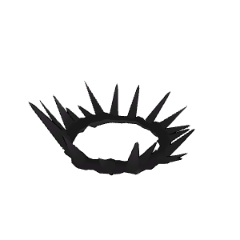
 トゲクラウン
 ゴールドクラウン
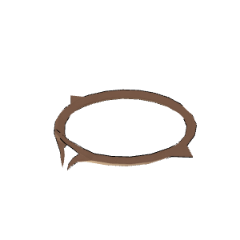
 花冠
使い方。
1- クラウン3Dをボディにドラッグする
2 - クラウン3Dをボディの頭部に取り付け、 サイズと位置を調整します。
3Dボディを動かすことができ、『クラウン3D』もそれに合わせて動き続けます。

 トゲクラウン
 ゴールドクラウン
 花冠
Fantasy Crowns 3D model.
Thorn CrownGold Crown
Floral Crown
How to use.
1- Drag the Crown 3D to the Body
2 - Attach the Crown 3D to Head point of The Body, adjust size and position.
You can now move the 3D body, and the 'Crown 3D' will continue to move along with it.
Thorn CrownGold CrownFloral Crownカテゴリー1 Category 1


 問題ある素材の報告
CLIP STUDIOアカウントをお持ちでない場合
以下を記載の上、メールでお問い合わせください。
- 製品・サービス名
- 詳しいお問い合わせ内容

使用できるソフトウェア
-
 CLIP STUDIO PAINT PRO/EX
 再ダウンロード
「年額・月額利用プラン」で認証していない端末でも使う場合は、GOLDかCLIPPYで購入してください。

価格
70

保有残高
 取得する
 購入が完了しました。
 素材の保存場所を見る


70
CLIPPY
種類
素材集

対応ソフトウェア
CLIP STUDIO PAINT PRO/EX
コンテンツID:
2323111

公開日 : 1日前
更新日 : 1日前





バッジ
-
 MVP ◆質問に対して適切な回答を数多く投稿し、コミュニティの運営に大きく貢献したユーザーです。MVPは3ヶ月に一度、その間に獲得したポイントを元に決定し、表彰を行っています。
-
 NVP (New Valuable Player) ◆MVPに次いでコミュニティの運営に貢献したユーザーです。これまでMVPの受賞経験のない方から、獲得したポイントを元に決定し、表彰を行なっています。
-
 公式エキスパート ◆優れた回答者の証であるMVP受賞者の中からさらに選ばれた、コミュニティで最も優良な回答者の証です。審査を経て当社から依頼し就任いただいています。※旧名称「エバンジェリスト」
-
 セルシス公認モデレーター ◆モデレーターは、日本語とその他の言語が話せるセルシス公認のスタッフです。ソフトウェアや創作のエキスパートではないので、直接疑問を解決することはできませんが、みなさんがスムーズにコミュニケーションできるように、言葉やコミュニケーションの側面からサポートします。
-
 セルシス公式運営に関連した公式アカウントです。