


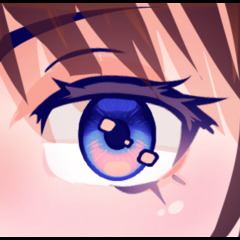


どんな色でも完璧に輝く目を描けるブラシ! A brush that draws perfect shiny eyes in any set of colors you want!
【 使い方 】
(1) - メインカラーとセカンダリーカラーを選びます。
⤷ メインカラーは二次色より鮮やかにせず暗くすることをおすすめします。
(2) - 希望する筆のサイズと太さを選んでください。
⤷ キャラクターの頭が回っている場合、外側の目は細くやや小さくなることがあります。
⤷ 目を大きく見せてキャラクターをより子供っぽく見せることもできます。
(3) - 目を望む場所に描く。
⤷ もし形が望む形に見えなくても、簡単に変形や液状化が可能です。
(4) - アイハイライトブラシを使って目元をツヤキヤにします。
⤷ ハイライトの形状や位置はアイブラシとは別なので、好きなようにカスタマイズできます。
これらすべてが必要なステップですが、よりカスタマイズしたい場合は以下の追加ステップを検討してください。
(5) - 勾配マップを使用。
⤷ グラデーションマップに最も多くの色が出る最良の結果を得るために、目を描く際は黒を主色、白を副色として使いましょう。
⤷ CSPに既に含まれているグラデーションマップを使うか、自分で試してみるか、アセットからダウンロードしたものを使うことができます。
[!]グラデーションマップを使う場合は、後からハイライトを追加することをおすすめします。これにより、ハイライトや輪郭の色をより細かくコントロールできます。時には目の色とは違う色にしたい場合もあります。
(6) - 新しいレイヤーで目の上をエアブラシで塗り、ブレンディングモードを使用します。
⤷ グロー は目を光らせるように見せるために使えます。
⤷ 乗算 は目の陰影を付けるために使えます。
⤷ オーバーレイ は目をより鮮やかに見せるために使えます。

同じサンライズ(紫)グラデーションマップ上の別の例ですが、元のメインカラーとサブカラーはそれぞれ黒と白で、上の2番目の例のようなネイビーやシアン色ではありません。ご覧の通り、色合いがずっと鮮やかに見えます。

サムネイルの例を挙げます。各目の主色および二次色は黒と白で、異なる陰鬱な陰影のグラデーションマップ(CSPに含まれています)があります。中間色は目の上にエアブラシで重ねて重ね合わせます。

【 How to use 】
(1) - Pick a main color and a secondary color.
⤷ I recommend making the main color less saturated but darker than the secondary color.
(2) - Choose the brush size and thickness you want.
⤷ If the character's head is turned, the outer eye may be thinner and slightly smaller.
⤷ You can make the eyes wider and bigger to make the character look more childlike.
(3) - Draw the eyes where you want them to be.
⤷ If the shape doesn't look the way you want, you can easily transform or liquify it to the shape you want.
(4) - Use the eye highlights brush to make the eyes look shiny.
⤷ You can customize the shape and location of the highlights to however you like since it's separate from the eye brush.
These are all the steps you need to do, but if you want more customization, consider the additional steps below:
(5) - Use a gradient map.
⤷ For the best results (most amount of colors in gradient map present), use black as a main color and white as a secondary color when drawing the eye.
⤷ You can use the gradient maps already included in CSP, experiment with your own, or use ones downloaded from assets.
[!] If you end up using a gradient map, I recommend adding highlights afterwards. This allows you to have more control over the color of the highlights and outline, since sometimes you may want them to be different from the eye color.
(6) - Airbrush over the eye in a new layer and use blending modes.
⤷ Glow can be used to make the eyes look like they are glowing.
⤷ Multiply can be used to shade the eyes.
⤷ Overlay can be used to make the eye look even more vibrant.
Here's another example on the same Sunrise (purple) gradient map, but with the original main and secondary colors being black and white respectively instead of navy and cyan like in the second example above. As you can see, the colors look much more vibrant.
Here are the examples from the thumbnail. Each eye's main color and secondary colors are black and white, with different Somber Shade gradient maps (included in CSP). The mid tone color is airbrushed over the the eyes in a layer above and set to overlay.
更新履歴


"素材集"の人気素材


新着素材



バッジ
-
 MVP ◆質問に対して適切な回答を数多く投稿し、コミュニティの運営に大きく貢献したユーザーです。MVPは3ヶ月に一度、その間に獲得したポイントを元に決定し、表彰を行っています。
 -
 NVP (New Valuable Player) ◆MVPに次いでコミュニティの運営に貢献したユーザーです。これまでMVPの受賞経験のない方から、獲得したポイントを元に決定し、表彰を行なっています。
 -
 公式エキスパート ◆優れた回答者の証であるMVP受賞者の中からさらに選ばれた、コミュニティで最も優良な回答者の証です。審査を経て当社から依頼し就任いただいています。※旧名称「エバンジェリスト」
 -
 セルシス公認モデレーター ◆モデレーターは、日本語とその他の言語が話せるセルシス公認のスタッフです。ソフトウェアや創作のエキスパートではないので、直接疑問を解決することはできませんが、みなさんがスムーズにコミュニケーションできるように、言葉やコミュニケーションの側面からサポートします。
 -
 セルシス公式運営に関連した公式アカウントです。