


【48Hfree】女性バストアップポーズ パック2.0 (【48Hfree】Female Bust Up Pose Pack 2.0) 【48Hfree】Female Bust Up Pose Pack 2.0
コンテンツID:2306727
-
412


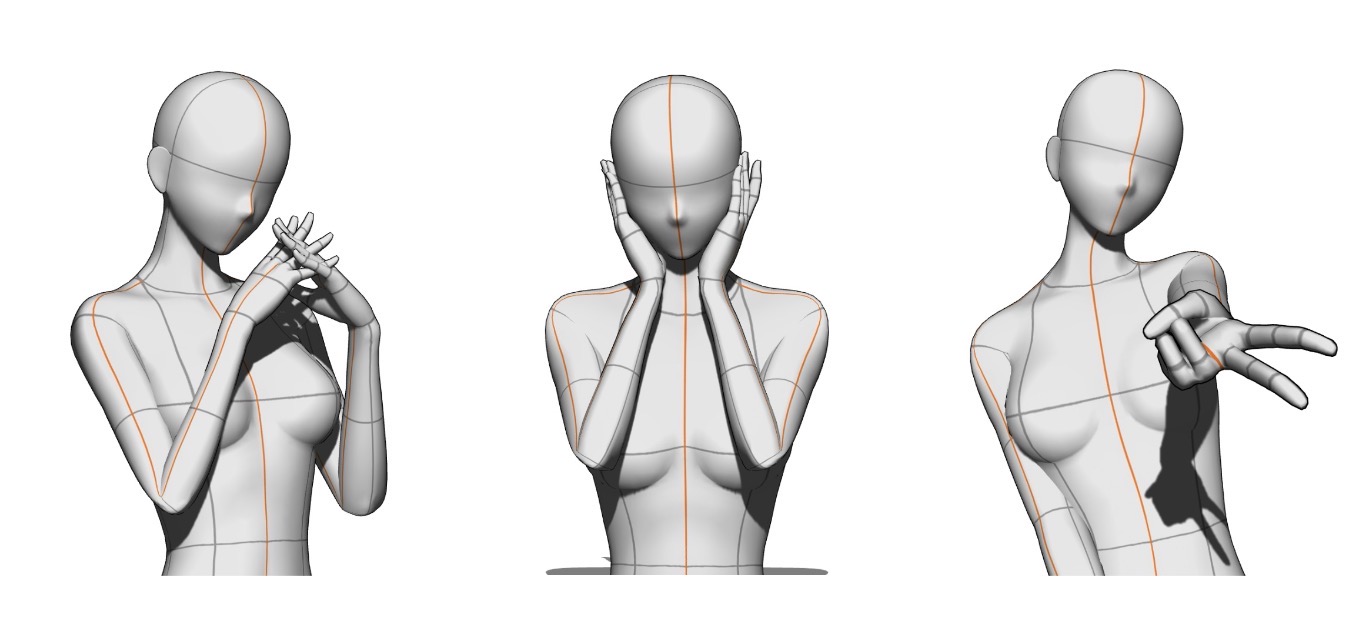
全部で3つのポーズ! 3 poses total!
きれいなキャラクターを描くための3つのバストアップポーズのセット。このパックは 、バストアップ専用のイラストに最適化されたかわいいポーズが見つからず、自分で作りました。どうぞお楽しみください!
免責事項:モデルたちはキャンバスにズームインし、上半身にフォーカスしてポーズをとっています。そのため、ポーズを取る際に下半身は考慮されていませんでした。カメラの視点にズームインし、上半身だけにフォーカスするのが最善です。
GALポーズについて
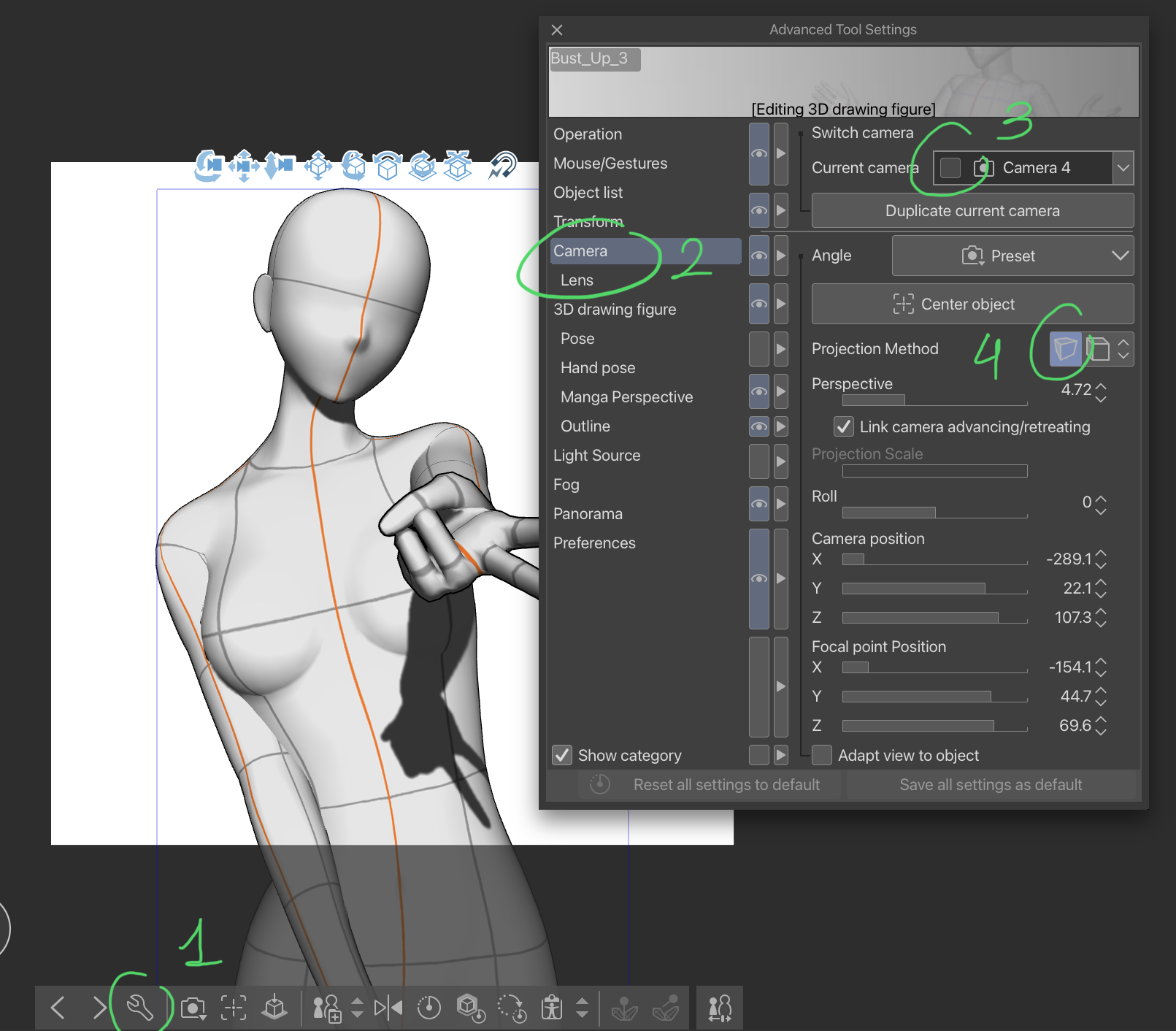
もしモデルが小さい手(逆さまのピースサインをしている方)で現れるが、上の画像のように拡大したい場合は、この簡単なチュートリアルに従って修正してください:
ステップ1:レンチアイコンをタップすると「高度なツール設定」ウィンドウが開きます。
ステップ2:「カメラ」メニューをクリックします。
ステップ3:現在のカメラがロックされていないか確認してください。ロックされている場合は必ずオフにしてください。
ステップ4:このアイコンをタップして遠近投影に切り替えれば完了です!
A/N: 3D画像素材からポーズ素材に切り替えるよう要請されたため、素材を更新しました。以前の資料カタログを更新できず、新しいものを発行せざるを得ませんでした。ご不便をおかけして申し訳ありません。
A set of 3 bust-up poses for drawing pretty characters. I made this pack because I struggled to find cute poses that are optimized for bust-up only illustrations, so I made some myself, please enjoy!
Disclaimer: The models were posed by zooming in on the canvas and focusing on the upper body. Therefore, the lower body was not taken into account while posing. It is best to zoom in on the camera view and focus on the upper body only.
About the GAL pose
If the model appears with a smaller hand (the one making the upside-down peace sign) but you’d prefer it to be enlarged just like in the image shown above, do follow this simple tutorial to fix it:
STEP 1: Tap on the wrench icon to open the “Advanced Tool Settings” window.
STEP 2: Click on the “Camera” menu.
STEP 3: Ensure that your current camera is not locked, if it is, please turn it off.
STEP 4: Tap on this icon to switch to perspective projection, and you’re done!
A/N: Updated the materials as I was requested to switch to pose materials instead of 3D image materials. It was not possible to update the previous material catalog, therefore I had to publish a new one, I apologize for the inconvenience.
壊れポーズ Bust Up Poses







"mengli"さんの別の素材


"素材集"の人気素材


新着素材




バッジ
-
 MVP ◆質問に対して適切な回答を数多く投稿し、コミュニティの運営に大きく貢献したユーザーです。MVPは3ヶ月に一度、その間に獲得したポイントを元に決定し、表彰を行っています。
 -
 NVP (New Valuable Player) ◆MVPに次いでコミュニティの運営に貢献したユーザーです。これまでMVPの受賞経験のない方から、獲得したポイントを元に決定し、表彰を行なっています。
 -
 公式エキスパート ◆優れた回答者の証であるMVP受賞者の中からさらに選ばれた、コミュニティで最も優良な回答者の証です。審査を経て当社から依頼し就任いただいています。※旧名称「エバンジェリスト」
 -
 セルシス公認モデレーター ◆モデレーターは、日本語とその他の言語が話せるセルシス公認のスタッフです。ソフトウェアや創作のエキスパートではないので、直接疑問を解決することはできませんが、みなさんがスムーズにコミュニケーションできるように、言葉やコミュニケーションの側面からサポートします。
 -
 セルシス公式運営に関連した公式アカウントです。