


フォルダ/レイヤー設定 V2(MEHOKKUCITY) (FOLDER/LAYER SETUP V2 (mechokkucity)) FOLDER/LAYER SETUP V2 (mechokkucity)
コンテンツID:2299342
-
170


フォルダテンプレートとレイヤー名の自動操作!
これは自分のワークフローに基づいて作りました。アートファイルを整理するのに役立つことを願っています!
Folder Template and Layer Names Autoaction!
I made this based on my own workflow. I hope it's useful to keep your art files organized!
- セットをオートアクションパレットに追加し、「ボタンモード」にしていることを確認してください。
- 名前を変更したいレイヤーを選択してください。
- その後、オートアクションセットのオプションのいずれかをクリックすると、レイヤーが自動的に名前変更されます!
- Add the set to the autoaction palette and make sure it's on "button mode"
- Select the layer you want to rename.
- Then click on one of the options from the autoaction set and the layer will be renamed automatically!
セット Set
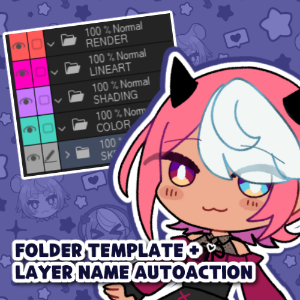
更新履歴
2026年8月24日:レイヤーテンプレートに「BG」フォルダを追加 - オートアクションにフォルダの作成と名前付けのオプションを追加しました。 8.24.26: Added "BG" folder to the layer template - Added the option to create and name folders to the autoactions.
旧バージョン





"素材集"の人気素材


新着素材





-
 MVP ◆質問に対して適切な回答を数多く投稿し、コミュニティの運営に大きく貢献したユーザーです。MVPは3ヶ月に一度、その間に獲得したポイントを元に決定し、表彰を行っています。
 -
 NVP (New Valuable Player) ◆MVPに次いでコミュニティの運営に貢献したユーザーです。これまでMVPの受賞経験のない方から、獲得したポイントを元に決定し、表彰を行なっています。
 -
 公式エキスパート ◆優れた回答者の証であるMVP受賞者の中からさらに選ばれた、コミュニティで最も優良な回答者の証です。審査を経て当社から依頼し就任いただいています。※旧名称「エバンジェリスト」
 -
 セルシス公認モデレーター ◆モデレーターは、日本語とその他の言語が話せるセルシス公認のスタッフです。ソフトウェアや創作のエキスパートではないので、直接疑問を解決することはできませんが、みなさんがスムーズにコミュニケーションできるように、言葉やコミュニケーションの側面からサポートします。
 -
 セルシス公式運営に関連した公式アカウントです。