



トンボの翼を作るためのベクター化キット A vectorized kit for making dragonfly wings
このセットは、以前自分が制作していたミニコミックのキャラクターのために作りました。このアセットチャレンジに合うと、ウィングキットが合うことに今気づきました!
含まれるもの:
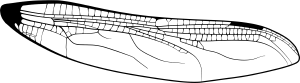
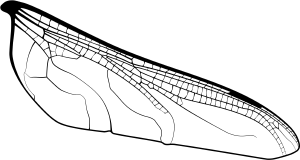
ベクターウィングベースは2つ(上下のウィングは分離されているので、必要に応じて回転や調整、角度変更が可能)

空いたスペースを埋めるシームレスなトンボのような音色。

使用方法:
翼のベースに満足したら、写真の空いているスペースを埋めましょう。ワンドツールで埋められた部分を選択します。参照フィルツールを使えばほぼ自動的にできます。あるいは、ラッソでエリアを選択したり、参照ワンドツールでエリアを指定したり、他のフォーマットでも構いません。コミックの場合は、フィルツール+セレクトが最も正確で迅速な方法だと感じています。

トンボのパターンを選択したエリアに追加します。音色の大きさを満足できるまで調整していきます。
翼の後ろにきれいな色を加え、不透明度を下げたり色のブレンドモードを変えたりします。

終わりだ!

ここでは翼にオパールやジュエルの色を使いました。楽しんでください。トンボは美しいですよ!
I made this set for a character in a mini comic I was working on in the past. I just realized the wing kit works for this asset challenge!
Included:
Two vector wing bases (Top and bottom wings are separated so you can rotate, adjust, skew them for perspective as needed)
A seamless dragonfly tone to fill the empty spaces easily.
To use:
Once you’re happy with the wing bases, fill the empty spaces pictured. Wand tool select the filled area. This is near automatic if you use a reference fill tool. ALTERNATIVELY, lasso select the area, reference wand tool the area, or any other format. For comics, I find fill tool + select is the most accurate and quick way.
Add the dragonfly pattern to the selected area. Adjust the size of the tone until you’re happy.
Add pretty colors behind the wing, then reduce opacity or change the blending mode of the colors.
You’re done!
Here, I used opal/jewel colors for the wings. Have fun with it, dragonflies are beautiful!
ウィング Wing

更新履歴
2026年8月17日:追加 Aug 17, 2026: Added







"Sneleste"さんの別の素材


"素材集"の人気素材


新着素材





バッジ
-
 MVP ◆質問に対して適切な回答を数多く投稿し、コミュニティの運営に大きく貢献したユーザーです。MVPは3ヶ月に一度、その間に獲得したポイントを元に決定し、表彰を行っています。
 -
 NVP (New Valuable Player) ◆MVPに次いでコミュニティの運営に貢献したユーザーです。これまでMVPの受賞経験のない方から、獲得したポイントを元に決定し、表彰を行なっています。
 -
 公式エキスパート ◆優れた回答者の証であるMVP受賞者の中からさらに選ばれた、コミュニティで最も優良な回答者の証です。審査を経て当社から依頼し就任いただいています。※旧名称「エバンジェリスト」
 -
 セルシス公認モデレーター ◆モデレーターは、日本語とその他の言語が話せるセルシス公認のスタッフです。ソフトウェアや創作のエキスパートではないので、直接疑問を解決することはできませんが、みなさんがスムーズにコミュニケーションできるように、言葉やコミュニケーションの側面からサポートします。
 -
 セルシス公式運営に関連した公式アカウントです。