




イラストのベースカラーを素早く塗るために、この磁気充填ツールを作りました。磁気機能が機能するには、半ばクリーンな線画が必要です。 I made these magnetic filling tools to quickly lay down the base colors for my illustrations. They require semi clean lineart for the magnetic feature to work.


素早く塗♡り絵をするための私のお気に入りの2つの道具
マジックラッソフィル:

まず、各線画レイヤーまたはそれらを含むフォルダをリファレンスレイヤーとして設定してください。 (それを行うには、「レイヤー」ウィンドウの上段にある小さな灯台アイコンをクリックし、レイヤー/フォルダを選択してください)
「Magic Lasso Fill by Elorian」というツールを選び、塗りたい色を選びます。次に、連続した線を1本引くか、接続したい点をタップしてエリアを選択します。参照された線画があれば、カーソルは自動的にそれにスナップし、カーソルが近づいたときにそれを指針として使います。
_________________________________________________________________________
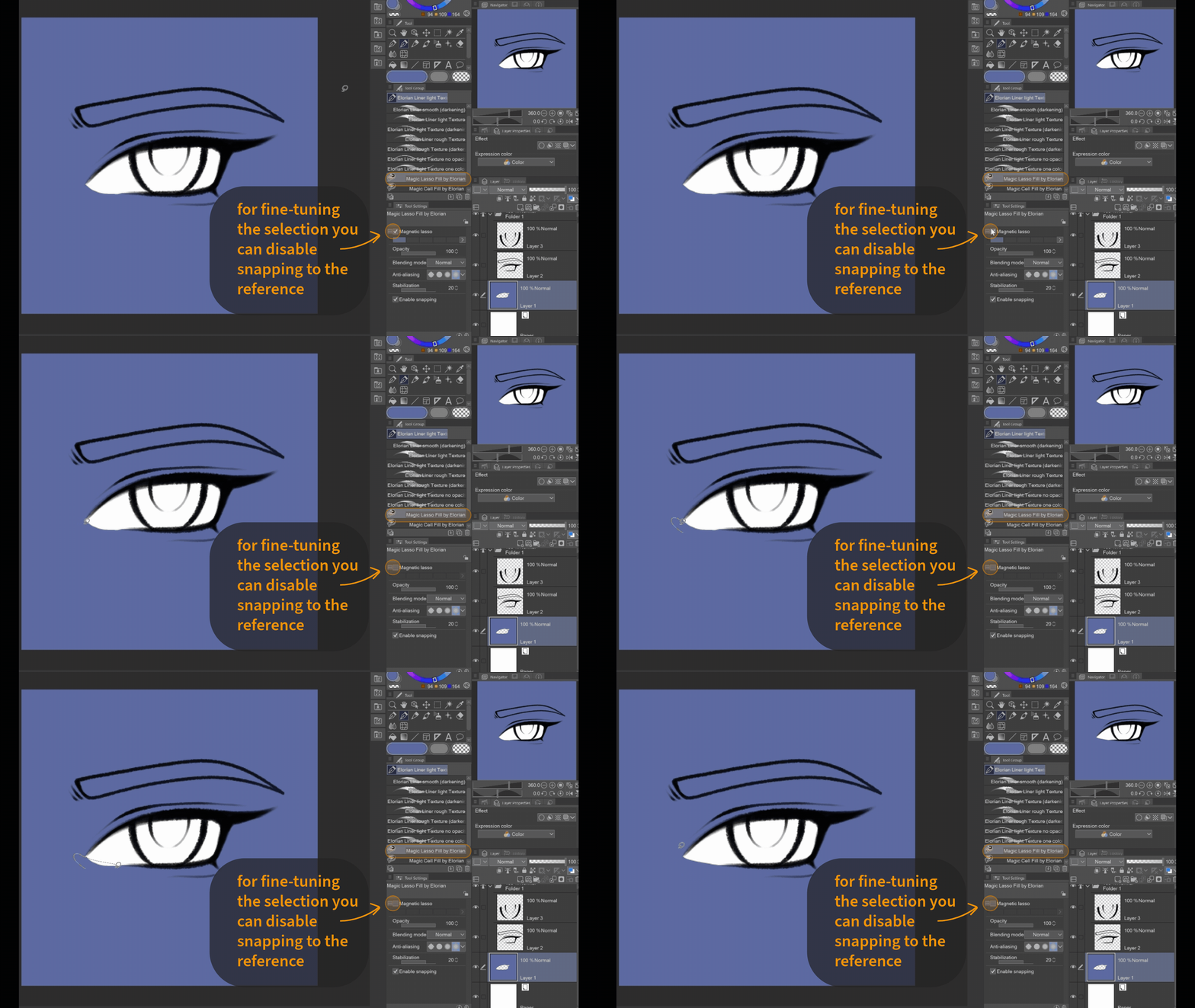
また、ツール設定で「磁気ラッソ」を有効にすることで、磁気充填ツールを通常のラッソ充填に変えることもできます。これは参照線に隙間がある場合に役立ちます。 (ツールプロパティウィンドウを常に開いたくない方のために、追加の非磁気ラッソフィルツールを追加します。)
_________________________________________________________________________

色で塗りたくなくて消したいなら、「transparent(透明)」を色に使えばいいですよ。
_________________________________________________________________________

磁気設定の最大限の効果を活かすには、線をなぞる必要はなく、複数のポイントでクリックするだけで、選択が自動的に参照線画に沿って移動します。
_________________________________________________________________________
マジックセルフィル:
このツールは閉じたセル(=他の色で完全に囲まれた領域)や線画を認識し、素早い塗りつぶしツールとして利用できます。
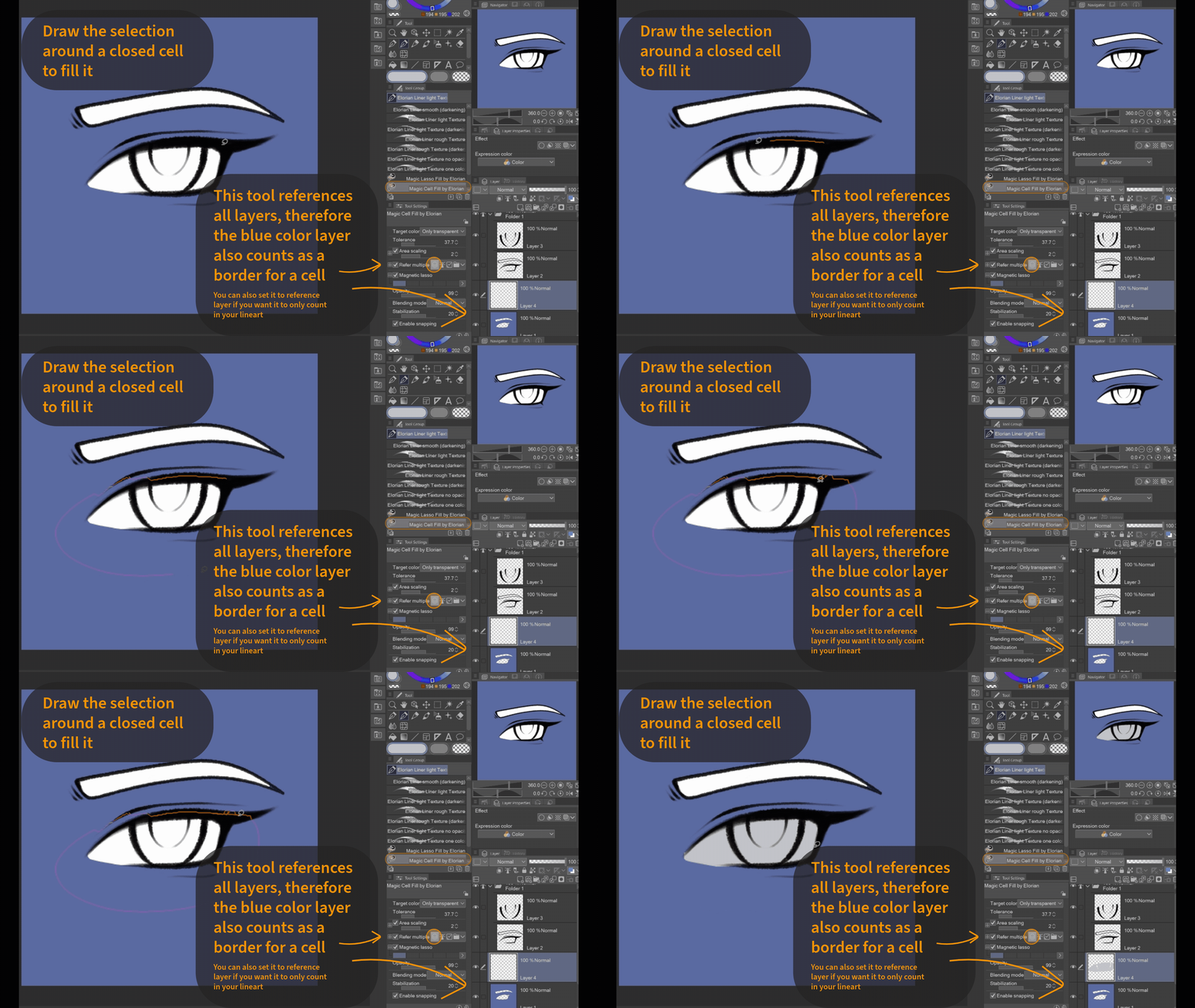
閉じたセルを選んで、その周囲をざっくり塗り、セル全体がその範囲内にあることを確認してください。
_________________________________________________________________________
塗っているレイヤー上の特定のピクセルをすべて埋めます。デフォルトは「すべての色」に設定されています(透明は色としてカウントされます)。
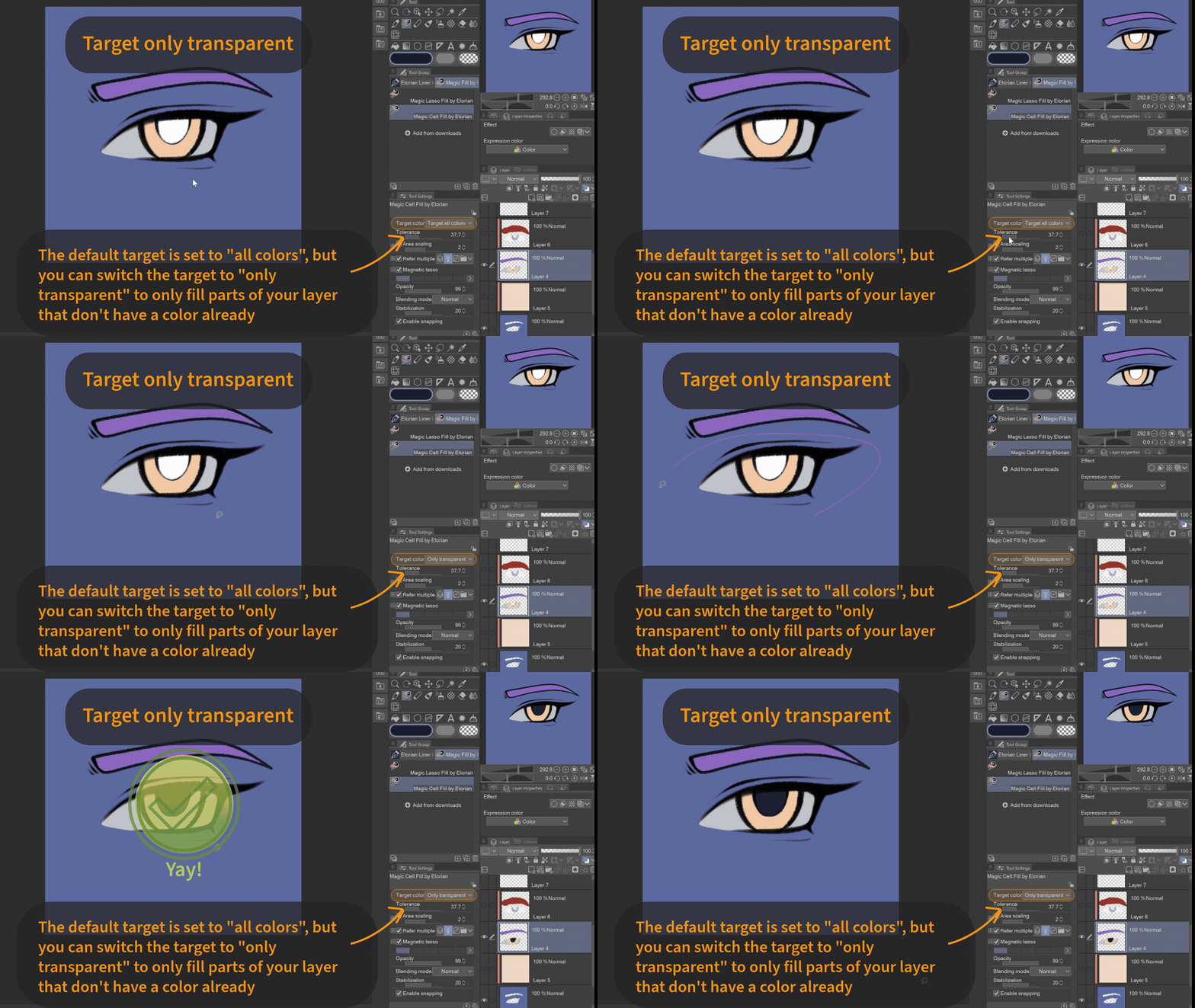
ただし、同じレイヤー上のすでに色がついた部分をオーバーペイントしないように、トランスアプレントピクセルだけをターゲットにしたい場合もあります。そのためには、設定でターゲットカラーを「透明のみ」に切り替えることができます。(ツールプロパティウィンドウを常に開いたくない方のために、透明なセルフィルツールを追加します。)
ただし、同じレイヤー上のすでに色がついた部分をオーバーペイントしないように、トランスアプレントピクセルだけをターゲットにしたい場合もあります。そのためには、設定でターゲットカラーを「透明のみ」に切り替えることができます。(ツールプロパティウィンドウを常に開いたくない方のために、透明なセルフィルツールを追加します。)
ここから:

これに対して:
_________________________________________________________________________
楽しんでください!♡
My two favourite tools for quick coloring ♡
Magic Lasso Fill:
First make sure to set each of your lineart layers or a folder containing them, as reference layer. (To do that click on the small lighthouse icon in the upper row of the "Layers"-window while the layers/folder are selected)
Choose the Tool "Magic Lasso Fill by Elorian" and select the color you want to fill with. Then select the area either by drawing one continuous line or tapping points you want to connect. If there is a referenced lineart, the cursor will automatically snap to it and use it as a guideline once the cursor comes near it.
_________________________________________________________________________
You can also turn the magnetic filling tool into a regular lasso fill by enabling "magnetic lasso" in the tool settings. This can come in handy when the reference lines have gaps. (For those of you who don't want to have the tool property window open all the time, I will add an additional non-magnetic Lasso Fill Tool.)
_________________________________________________________________________
If you don't want to fill an area with color, but to erase, then just use "transparent" as a color.
_________________________________________________________________________
To use the full potential of the magnetic setting, you dont have to trace the line but can simply click on it on multiple points and the selection will automatically go along the reference lineart.
_________________________________________________________________________
Magic Cell Fill:
This tool recognizes closed cells (= areas that are fully enclosed by other colors) as well as lineart and can be used as a quick filling tool.
Choose any closed cell and roughly paint around it, make sure the whole cell is within the selection.
_________________________________________________________________________
It will fill all pixels of a certain type on the layer youre painting on. The default is set to "all colors" (transparency counts as color).
But sometimes you might want to only target transaprent pixels to not overpaint already colored areas on the same layer. For that you can switch the target color in the settings to "only transparent". (For those of you who don't want to have the tool property window open all the time, I will add an additional only transparent Cell Fill Tool.)
But sometimes you might want to only target transaprent pixels to not overpaint already colored areas on the same layer. For that you can switch the target color in the settings to "only transparent". (For those of you who don't want to have the tool property window open all the time, I will add an additional only transparent Cell Fill Tool.)
From this:
To this:
_________________________________________________________________________
Have Fun! ♡
エロリアンによるマジックフィルツール Magic Fill Tools by Elorian








"Elorian_art"さんの別の素材


"素材集"の人気素材


新着素材


バッジ
-
 MVP ◆質問に対して適切な回答を数多く投稿し、コミュニティの運営に大きく貢献したユーザーです。MVPは3ヶ月に一度、その間に獲得したポイントを元に決定し、表彰を行っています。
 -
 NVP (New Valuable Player) ◆MVPに次いでコミュニティの運営に貢献したユーザーです。これまでMVPの受賞経験のない方から、獲得したポイントを元に決定し、表彰を行なっています。
 -
 公式エキスパート ◆優れた回答者の証であるMVP受賞者の中からさらに選ばれた、コミュニティで最も優良な回答者の証です。審査を経て当社から依頼し就任いただいています。※旧名称「エバンジェリスト」
 -
 セルシス公認モデレーター ◆モデレーターは、日本語とその他の言語が話せるセルシス公認のスタッフです。ソフトウェアや創作のエキスパートではないので、直接疑問を解決することはできませんが、みなさんがスムーズにコミュニケーションできるように、言葉やコミュニケーションの側面からサポートします。
 -
 セルシス公式運営に関連した公式アカウントです。