


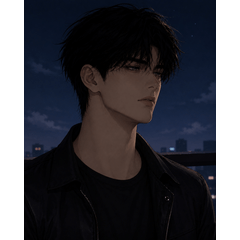

私がデザインし、現在自分のマンファ/ウェブトゥーンプロジェクトのキャラクターに使っている男子高校の制服とスーツのスタイリストです。この2D画像素材は、リアルな布の折り目とクリーンな線画で完全にレンダリングされています。やることは、ドラップしてドロップし、キャラクターにぴったり合わせるだけで描画時間を大幅に節約できます。個人的または商業的なウェブトゥーンプロジェクトにぴったりです。 A stylist male high school uniform and suit that I designed and currently use for the characters in my own manhwa/webtoon project. This 2D image material is fully rendered with realistic fabric folds and clean lineart. All you need to do is drap and drop it, then fit it right onto your character to save tons of drawing time. Perfect for you personal or commercial webtoon project.
1. マテリアルフォルダからマテリアルを直接キャンバスにドラッグ&ドロップします。
2. 『Operation』ツール(オブジェクトサブツール)を使って、キャラクターの体型に合わせて衣装をスケール、回転、調整します。
3. キャラクターの頭部・首レイヤーをこの衣装レイヤーの上に置く。
4. 必要に応じて重なる体の部位を消すかマスキングする。
1. Drag and drop the material from your Material folder directly onto your canvas.
2. Use the ‘Operation’ tool ( Object sub-tool ) to scale, rotate and adjust the outfit to fit your character’s body pose.
3. Place your character’s head/neck layer above this outfit layer.
4. Erase or mask any overlapping body parts if necessary.








"Keiel"さんの別の素材


"画像素材"の人気素材




新着素材




バッジ
-
 MVP ◆質問に対して適切な回答を数多く投稿し、コミュニティの運営に大きく貢献したユーザーです。MVPは3ヶ月に一度、その間に獲得したポイントを元に決定し、表彰を行っています。
 -
 NVP (New Valuable Player) ◆MVPに次いでコミュニティの運営に貢献したユーザーです。これまでMVPの受賞経験のない方から、獲得したポイントを元に決定し、表彰を行なっています。
 -
 公式エキスパート ◆優れた回答者の証であるMVP受賞者の中からさらに選ばれた、コミュニティで最も優良な回答者の証です。審査を経て当社から依頼し就任いただいています。※旧名称「エバンジェリスト」
 -
 セルシス公認モデレーター ◆モデレーターは、日本語とその他の言語が話せるセルシス公認のスタッフです。ソフトウェアや創作のエキスパートではないので、直接疑問を解決することはできませんが、みなさんがスムーズにコミュニケーションできるように、言葉やコミュニケーションの側面からサポートします。
 -
 セルシス公式運営に関連した公式アカウントです。