


VTuber Fodelr - Folder Template (VTuber Fodelr - Folder Template) VTuber Fodelr - Folder Template
コンテンツID:2278465
-
15,178


テンプレート の使い方
- 新しいファイルを作成します。サイズを 3000 px x 4500 px、300 dpiに設定してください。
- 紙の色の下にある 「テンプレート」 オプションを有効にしてください。
- 「VTuber model folder template」で検索し、ダブルクリックでファイルを選択してください。
- OKをクリックすると、テンプレートが適用され、すぐに使えるようになります。
ワークフローに合わせて自由に並べ替えたり追加したりしてください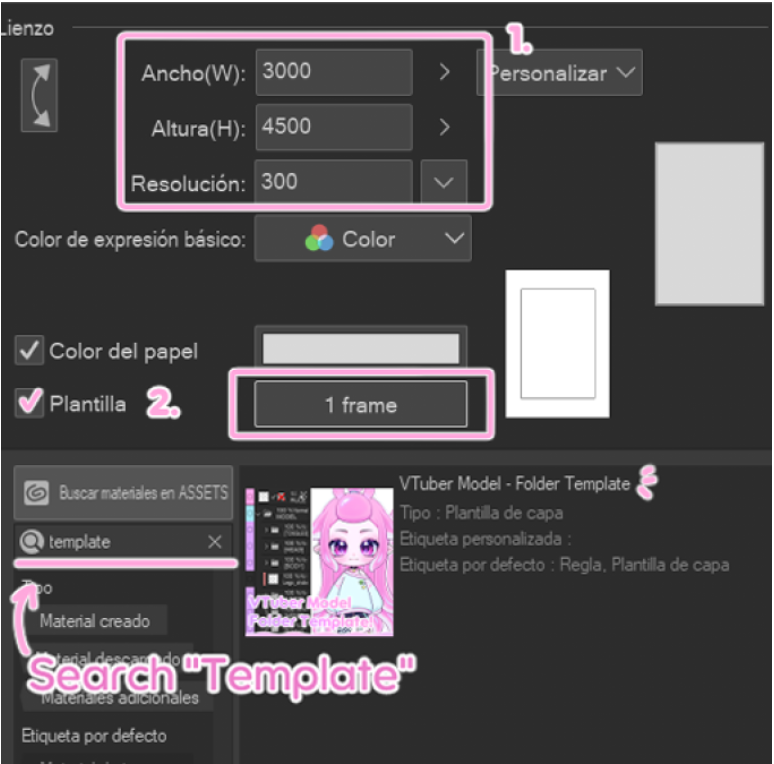
更新:例モデルはガイドラインに沿うように削除されました
How to use the template
- Create a new file. Set the size to 3000 px x 4500 px at 300 dpi.
- Enable the "Template" option located under paper color.
- Search "VTuber model folder template" and select the file with a double click.
- Click OK, and the template will be applied and ready to use.
Feel free to rearrange or add anything to fit your workflow
Update: The example model has been removed so that the assets align with the guidelines
旧バージョン







"Zovvi"さんの別の素材

"レイヤーテンプレート"の人気素材


新着素材





バッジ
-
 MVP ◆質問に対して適切な回答を数多く投稿し、コミュニティの運営に大きく貢献したユーザーです。MVPは3ヶ月に一度、その間に獲得したポイントを元に決定し、表彰を行っています。
 -
 NVP (New Valuable Player) ◆MVPに次いでコミュニティの運営に貢献したユーザーです。これまでMVPの受賞経験のない方から、獲得したポイントを元に決定し、表彰を行なっています。
 -
 公式エキスパート ◆優れた回答者の証であるMVP受賞者の中からさらに選ばれた、コミュニティで最も優良な回答者の証です。審査を経て当社から依頼し就任いただいています。※旧名称「エバンジェリスト」
 -
 セルシス公認モデレーター ◆モデレーターは、日本語とその他の言語が話せるセルシス公認のスタッフです。ソフトウェアや創作のエキスパートではないので、直接疑問を解決することはできませんが、みなさんがスムーズにコミュニケーションできるように、言葉やコミュニケーションの側面からサポートします。
 -
 セルシス公式運営に関連した公式アカウントです。