



友人の別のプログラムのレイアウトを元にした非常に簡素なセットアップです。
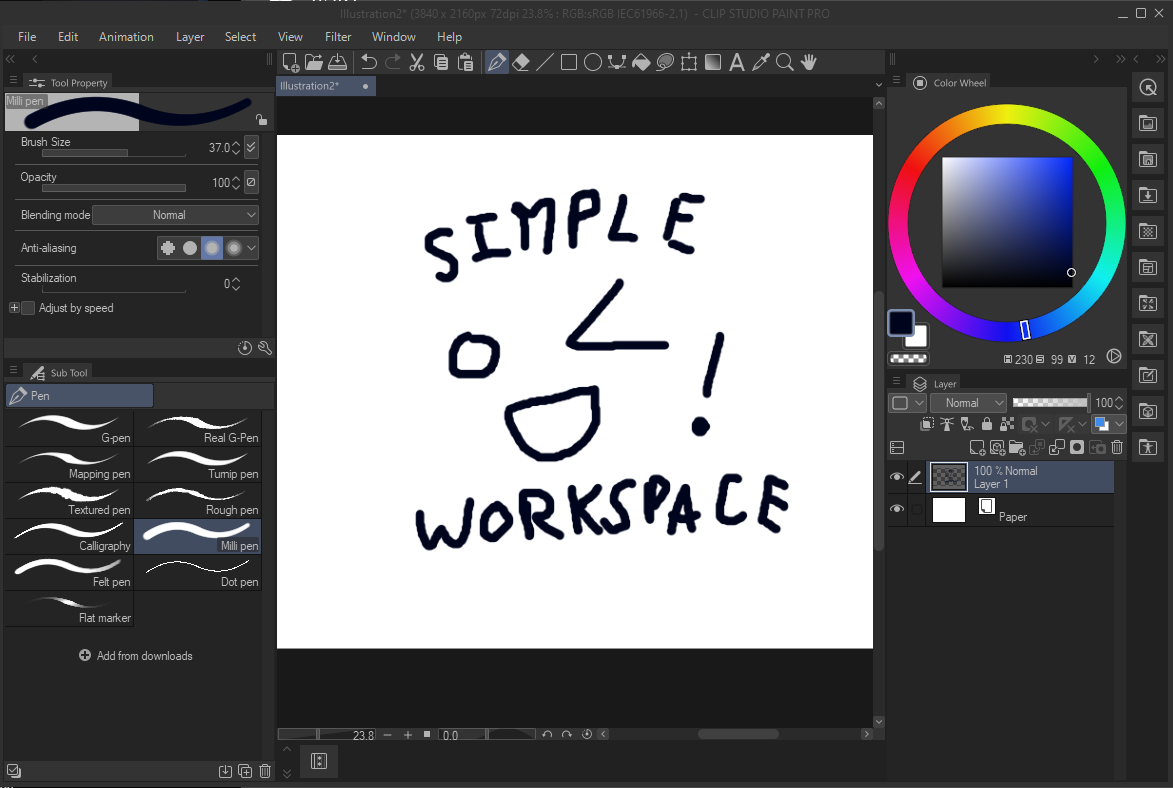
もう一方のプログラムのレイアウトでは、ツールバーが画面上部にありました。CSPツールバーを画面上部に水平にスナップする方法がないので、コマンドバーで再現しました。追加のショートカットを追加する場合(例えばブラシを複数の別々のツールに分類している場合など)、コマンドバーを右クリックして「コマンドバー設定」→「メニューコマンド」>→>「ツール」を押すと、通常のツールバーにあるすべてのツールを追加できます。
a very barebones setup based off of a friend's layout in another program.
the layout in the other program had the toolbar at the top of the screen. since there's no way to snap the CSP toolbar to the top of the screen horizontally, i recreated it using the command bar. in order to add additional shortcuts (for example, if you have your brushes sorted into multiple separate tools), right click the command bar, then press "command bar settings" -> "menu commands" -> "tools" and everything that would be on the normal toolbar is available to add.


"ワークスペース"の人気素材




新着素材


バッジ
-
 MVP ◆質問に対して適切な回答を数多く投稿し、コミュニティの運営に大きく貢献したユーザーです。MVPは3ヶ月に一度、その間に獲得したポイントを元に決定し、表彰を行っています。
 -
 NVP (New Valuable Player) ◆MVPに次いでコミュニティの運営に貢献したユーザーです。これまでMVPの受賞経験のない方から、獲得したポイントを元に決定し、表彰を行なっています。
 -
 公式エキスパート ◆優れた回答者の証であるMVP受賞者の中からさらに選ばれた、コミュニティで最も優良な回答者の証です。審査を経て当社から依頼し就任いただいています。※旧名称「エバンジェリスト」
 -
 セルシス公認モデレーター ◆モデレーターは、日本語とその他の言語が話せるセルシス公認のスタッフです。ソフトウェアや創作のエキスパートではないので、直接疑問を解決することはできませんが、みなさんがスムーズにコミュニケーションできるように、言葉やコミュニケーションの側面からサポートします。
 -
 セルシス公式運営に関連した公式アカウントです。