



選んだロゴの透かしをつけるマーカー!これはAIを混乱させるための音を立てる提案だと思いましたが、盗まれたくないサンプルを送信するのにも効果的です。 A marker to make watermarks out of your logo of choice! Saw this as a suggestion to make noise to mess up AI, but also works for sending samples that you don't want stolen.
ずっと前に配信でこれをやっている様子を見せて、チュートリアルを作ると言いました。


私は一度もそうしませんでした。
今はそうだと思います!
これは透かしをつけるマーカーです!提供されているブラシの形状はサンプルに過ぎず、ロゴや形状に簡単に交換できます。
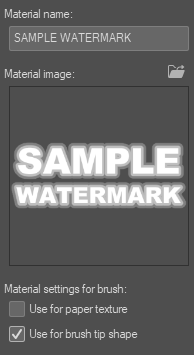
レイヤーに付けたいロゴや形状をマテリアルにドラッグし、そこに入ったらブラシ先形状の使い方として設定します。
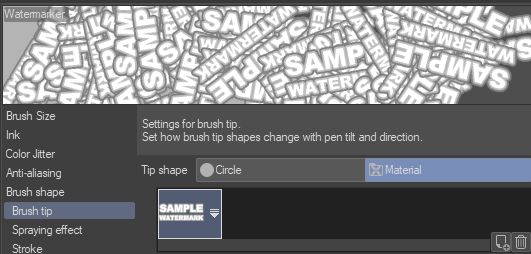
ブラシ設定に入り、ブラシの先端で希望するマテリアル形状を選択します。形が多い場合は、見つけやすい名前にしてください!
その後は、筆でキャンバス全体を一気に叩きつければ、ラグもあまり起きないはずです。
そして、選択した不透明度設定でオーバーレイに設定します。

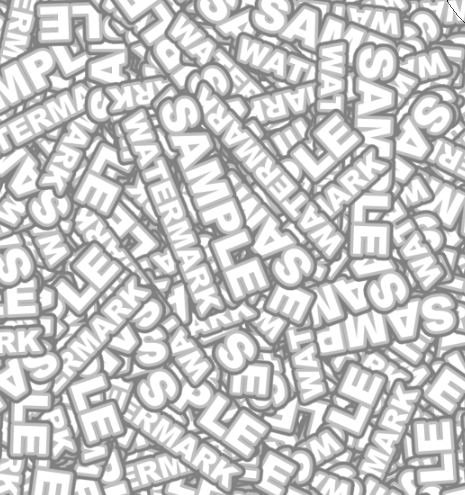
完了!これで、透かしのある画像セットが至る所にあります。
これがAIに対しても通用するかはわかりませんが、今ではあなたの透かしがあちこちにあって、ロゴや形状によって面白いテクスチャを作ることができます。念のため、私の透かしが実際にこの写真に貼られているので、同じことをおすすめします。

参考になれば幸いです。アート制作を楽しんでください!
I showed doing this on stream many moons ago and said I would make a tutorial.
I never did.
I am now I suppose!
This is a marker that makes watermarks! The provided brush shape is just a sample and can be swapped out easily with your logo or shape of choice.
Simply take the logo or shape you want on a layer, drag it over to your materials, and when it is in there, set as use for brush tip shape.
Go into the brush settings and under brush tip, select the material shape you would like. Make sure it is an easy name to find if you have a lot of shapes!
Afterwards, simply blast the whole canvas with the brush, shouldn't lag too bad or anything.
Then set to overlay with the opacity setting of your choice.
And done! You now have an image set with watermarks EVERYWHERE.
I do not know if this still holds up against AI, but it does now have your watermark all over it, and can make interesting textures depending on the logo or shape. Just to be extra safe, my watermark is actually on this, and I would suggest the same.
Hope this helps. Have a happy time making art!


"TheHamWarrior"さんの別の素材

"ブラシ"の人気素材


新着素材


バッジ
-
 MVP ◆質問に対して適切な回答を数多く投稿し、コミュニティの運営に大きく貢献したユーザーです。MVPは3ヶ月に一度、その間に獲得したポイントを元に決定し、表彰を行っています。
 -
 NVP (New Valuable Player) ◆MVPに次いでコミュニティの運営に貢献したユーザーです。これまでMVPの受賞経験のない方から、獲得したポイントを元に決定し、表彰を行なっています。
 -
 公式エキスパート ◆優れた回答者の証であるMVP受賞者の中からさらに選ばれた、コミュニティで最も優良な回答者の証です。審査を経て当社から依頼し就任いただいています。※旧名称「エバンジェリスト」
 -
 セルシス公認モデレーター ◆モデレーターは、日本語とその他の言語が話せるセルシス公認のスタッフです。ソフトウェアや創作のエキスパートではないので、直接疑問を解決することはできませんが、みなさんがスムーズにコミュニケーションできるように、言葉やコミュニケーションの側面からサポートします。
 -
 セルシス公式運営に関連した公式アカウントです。