



魔法陣を簡単に作れるレイヤーテンプレート。 Layer template for easily making magic circles.
これは、ビジュアルノベルの魔法陣をデザインする際に設置したレイヤーと定規のセットです。定規は可能な限り保存されます。最初は丸以外のすべての層を外しています。欲しいものをオンにして新しいレイヤーにマージし、好きなエフェクトを使えばいいです。もっと楽しい要素を加えたいなら、円形の文字や模様入りのブラシなどを加えるのも良いでしょう。「Smart Shape」は、より細かい描き方にとても役立ちます。
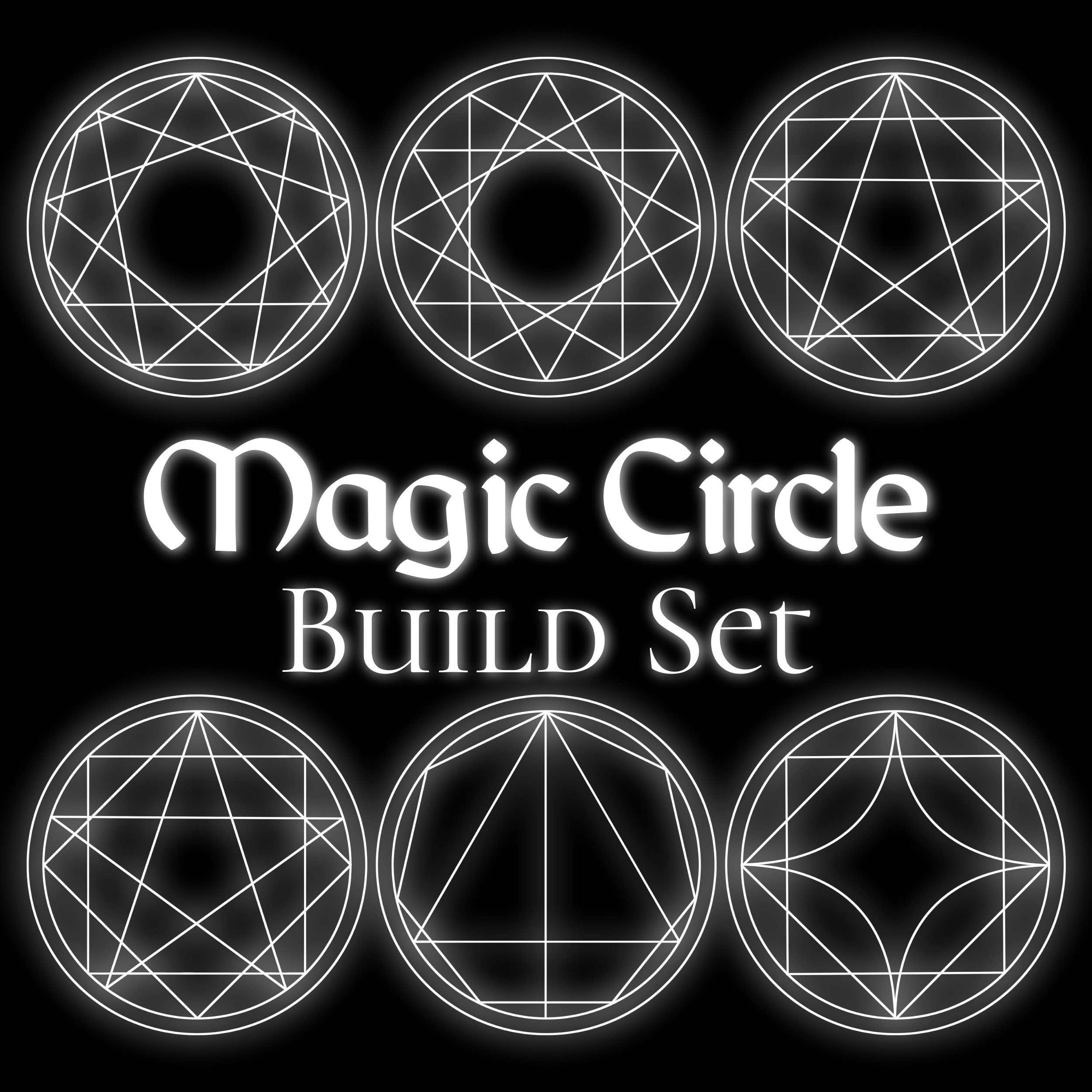

きちんとしようとしましたが、これらは数学的に完璧ではありません。最初は形状の組み合わせが少しずれてしまうこともありますが、すべてベクターレイヤーなので調整は簡単なはずです。プロのコツ:「垂直・水平中心の整列」を使って、物をきれいに整えましょう。
輝きを加えるには、魔法陣を複製してぼかしてください。ガウスやラジアルのぼかしはよく機能します。
形状は以下の通りです(下の写真参照):
円、三角形、ダイヤモンド、正方形
5から12個の尖角星型多角形
5から12の尖った多角形
円、三角形、ダイヤモンド、正方形
5から12個の尖角星型多角形
5から12の尖った多角形
楽しんでください!お役に立てば幸いです。:)

It's a set of layers and rulers I set up while designing magic circles for my visual novel. Rulers are preserved where possible. It starts with all the layers off except the circles. Just turn on the ones you want, merge to a new layer, and then use whatever effects you'd like. To add more fun elements, you could add circular text, patterned brushes, etc. "Smart Shape" is great for drawing in more details.
I tried to be tidy, but these are not mathematically perfect. Some combinations of shapes might come out slightly mis-aligned at first, but everything is vector layers so it should be easy to adjust. Pro tip: Use "Align Vertical/Horizontal Centers" to help line things up neatly.
To add a glow, duplicate your magic circle and blur it. Gaussian and radial blurs work well.
Shapes included (pictured below):
Circles, triangles, diamonds and squares
5 to 12 pointed star polygons
5 to 12 pointed polygons
Circles, triangles, diamonds and squares
5 to 12 pointed star polygons
5 to 12 pointed polygons
Have fun! I hope it's useful. :)





"doodlemancy"さんの別の素材


"レイヤーテンプレート"の人気素材


新着素材







バッジ
-
 MVP ◆質問に対して適切な回答を数多く投稿し、コミュニティの運営に大きく貢献したユーザーです。MVPは3ヶ月に一度、その間に獲得したポイントを元に決定し、表彰を行っています。
 -
 NVP (New Valuable Player) ◆MVPに次いでコミュニティの運営に貢献したユーザーです。これまでMVPの受賞経験のない方から、獲得したポイントを元に決定し、表彰を行なっています。
 -
 公式エキスパート ◆優れた回答者の証であるMVP受賞者の中からさらに選ばれた、コミュニティで最も優良な回答者の証です。審査を経て当社から依頼し就任いただいています。※旧名称「エバンジェリスト」
 -
 セルシス公認モデレーター ◆モデレーターは、日本語とその他の言語が話せるセルシス公認のスタッフです。ソフトウェアや創作のエキスパートではないので、直接疑問を解決することはできませんが、みなさんがスムーズにコミュニケーションできるように、言葉やコミュニケーションの側面からサポートします。
 -
 セルシス公式運営に関連した公式アカウントです。