



いくつかの点が混乱したり、思っていた通りに動作しないのを見て、Webtoons用の古い凝ったレイヤーテンプレートを作り直しました。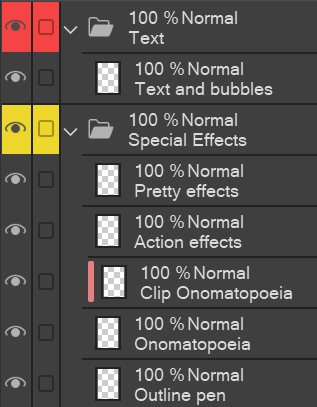

もしとても凝ったレイヤーテンプレートが欲しいなら、「Layer Template: Webtoon (very elaborate)」で検索するか、私のプロフィールの最初の投稿をご覧ください:)
使い方:
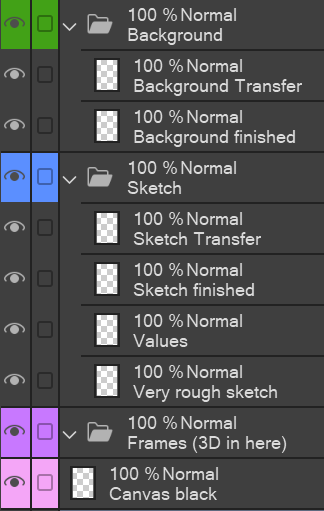
- すべてのフレームレイヤーを「Frames (3D in here)」フォルダにまとめてください。スマート選択ツールを使ってフレームの内部に描画してください(ただし他のレイヤーで描くので、すべてのパネルごとにテンプレートを貼り付ける必要はありません)。3Dモデルは選択した領域に留まることができないので、それらをフレーム内に引き寄せなければなりません。
- 「Sketch」フォルダでは、まず「非常にラフなスケッチ」レイヤーでストーリーボードを作成し、値をよく考えてから、より凝ったスケッチに進みます。
- 私は「X 完成」と「X 転送」(スケッチ、 背景 、キャラクター の各フォルダにあります )のシステムを使っています。まず「転送」レイヤーに描き、満足したら「レイヤー」の下の「下のレイヤーに転送」機能を使って「完成した」レイヤーに転送します。こうすれば、例えば髪の線画だけを描くことに集中でき、顔の線画の一部を消す心配をしなくて済みます。[私は「レイヤーをマージする」機能よりも「転送」機能の方が好みです。なぜなら、毎回新しいレイヤーを作成する必要がないからです。
- 特殊効果 レイヤーの 説明:「アウトラインペン」は、私がアウトラインペンで使うあらゆる効果、例えばおしゃべりや笑い声、イライラ、動きの線、スニッカー のような 音の単語に使います。「オノマトペイア」はBOOM! のような 大きな効果音用で、「クリップ」バージョンはグラデーションやパターンを室内で作りたい場合に使います。
- キャンバスブラック は、キャンバス全体が黒であるべきで、紙全体が黒くできないシーン用です。バケツツールを使えばいいのです。
- テキストでは、すべてのテキストと吹き出しを一つのレイヤーに統合して圧倒されないようにしています。それでも各パーツを別々に動かすことは可能です。

I´ve reworked my old elaborate layer template for webtoons after seeing how some things were confusing/ not working how I thought they would.
If you want a veeeery elaborate layer template, search for "Layer Template: Webtoon (very elaborate)" or go to the first post on my profile :)
How to use:
- Pull all your frame layers into the "Frames (3D in here)" folder. Use the Smart selection tool to draw inside the Frames (but on the other layers, so you don´t need to paste the template for every panel). Since 3D models can´t stay in the selected area, you have to pull those into the frame.
- In the "Sketch" folder, I like to first do the storyboard on the "very rough sketch" layer, and think the values through, before I move on to the more elaborate sketch.
- I work with a system of "X finished" and "X Transfer" (to be found in Sketch, Background, and Characters folders). I draw on the "Transfer" layer first, and once I´m satisfied, I use the "Transfer to lower layer" function (under "Layer") to transfer it onto the "finished" layer. This way, I can focus on drawing e.g. only the hair lineart first and not worry about erasing parts of the face lineart. [I prefer the "transfer" function to the "merge layers" function, because this way, I don´t need to create a new layer every time.
- Explanations to the Special Effects layers: "Outline pen" is for every effect I would use the outline pen for, e.g. chatter/ laughing, annoyed, movement lines, sound words like snicker etc. "Onomatopoeia" is for the big sound effects like BOOM! and the "clip" version is in case you want to do gradients or patterns inside.
- Canvas black is for those scenes where your canvas should be black but you can´t make the paper black because it´s not the entire page; just use the bucket tool.
- in Text, I merge all my texts and speech bubbles into one layer so it doesn´t get overwhelming; you can still move each part separately anyway.


"Arifryer"さんの別の素材

"レイヤーテンプレート"の人気素材


新着素材



バッジ
-
 MVP ◆質問に対して適切な回答を数多く投稿し、コミュニティの運営に大きく貢献したユーザーです。MVPは3ヶ月に一度、その間に獲得したポイントを元に決定し、表彰を行っています。
 -
 NVP (New Valuable Player) ◆MVPに次いでコミュニティの運営に貢献したユーザーです。これまでMVPの受賞経験のない方から、獲得したポイントを元に決定し、表彰を行なっています。
 -
 公式エキスパート ◆優れた回答者の証であるMVP受賞者の中からさらに選ばれた、コミュニティで最も優良な回答者の証です。審査を経て当社から依頼し就任いただいています。※旧名称「エバンジェリスト」
 -
 セルシス公認モデレーター ◆モデレーターは、日本語とその他の言語が話せるセルシス公認のスタッフです。ソフトウェアや創作のエキスパートではないので、直接疑問を解決することはできませんが、みなさんがスムーズにコミュニケーションできるように、言葉やコミュニケーションの側面からサポートします。
 -
 セルシス公式運営に関連した公式アカウントです。