



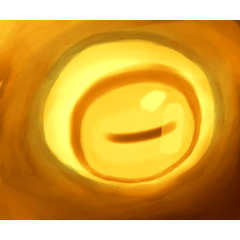
光る効果を生み出すオートアクション。
使用するには:
1. 光らせたいレイヤーを選択します。
2. [自動アクションの再生] を押します。
3. たた!今、光っています!
4. 輝きが十分に強くないと思われる場合は、ステップ 2 を何度でも繰り返すことができます。
5.レイヤーブレンドモードをいじることもできます。
下のアートのキャラクターの後ろのハローは効果を3回使用する。
(このアセットに使用されているすべてのアートは、Ameliko(ND)によって作成されています。
An Auto Action that creates a glowing effect.
To Use:
1. select the layer that you want to glow.
2. Press Play Auto Action.
3. Ta-da! It is now glowing!
4. If you think the glow isn't strong enough you can repeat Step 2 as many times as you want.
5. You can also play around with the layer blending modes.
The halo behind the character in the art below uses the effect 3 times.
(all art used for this asset is made by Ameliko (N.D.)



"CyanUmbreon"さんの別の素材


"オートアクション"の人気素材


新着素材







-
 MVP ◆質問に対して適切な回答を数多く投稿し、コミュニティの運営に大きく貢献したユーザーです。MVPは3ヶ月に一度、その間に獲得したポイントを元に決定し、表彰を行っています。
 -
 NVP (New Valuable Player) ◆MVPに次いでコミュニティの運営に貢献したユーザーです。これまでMVPの受賞経験のない方から、獲得したポイントを元に決定し、表彰を行なっています。
 -
 公式エキスパート ◆優れた回答者の証であるMVP受賞者の中からさらに選ばれた、コミュニティで最も優良な回答者の証です。審査を経て当社から依頼し就任いただいています。※旧名称「エバンジェリスト」
 -
 セルシス公認モデレーター ◆モデレーターは、日本語とその他の言語が話せるセルシス公認のスタッフです。ソフトウェアや創作のエキスパートではないので、直接疑問を解決することはできませんが、みなさんがスムーズにコミュニケーションできるように、言葉やコミュニケーションの側面からサポートします。
 -
 セルシス公式運営に関連した公式アカウントです。