


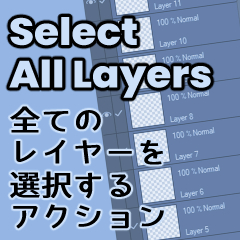
Select All Layers (全てのレイヤーを選択) v2 (Select All Layers (全てのレイヤーを選択) v2) Select All Layers (全てのレイヤーを選択) v2
コンテンツID:2000569
-
699


すべてのレイヤーを選択できるアクション + 既存のすべてのレイヤーを 1 つのフォルダーにダンプするアクション。自分でレイヤーを選択する必要はありません。 Action that lets you select all layers + Action that dumps all existing layers into one folder. No need to select any layers yourself.
- English & Japanese versions
- Action to select all layers as is
- Action to dump everything into one folder
- Action to select that "everything folder"
- An "error, cannot operate command 'top'" may appear if you have the very top layer selected, but it will still work fine.
- It gets grumpy and not work under these conditions:
- You have "Paper" layer selected
- You only have 1 layer visible
- 全てのレイヤーを一気に選択するアクション
- 現存のレイヤー全てを1つのフォルダーに放り込むアクション
- 全て放り込んだフォルダーを選択して一気に全て選択するアクション
- すでに一番上のレイヤーを選択した状態で使うと、エラーメッセージが出ることがありますが、スルーしても大丈夫です。
- 以下の状態で使うとへそを曲げて失敗してしまいます:
- 『ペーパー』レイヤーを選択している場合
- 一つのレイヤー以外全部非表示にしている場合
- English & Japanese versions
- Action to select all layers as is
- Action to dump everything into one folder
- Action to select that "everything folder"
- An "error, cannot operate command 'top'" may appear if you have the very top layer selected, but it will still work fine.
- It gets grumpy and not work under these conditions:
- You have "Paper" layer selected
- You only have 1 layer visible
- 全てのレイヤーを一気に選択するアクション
- 現存のレイヤー全てを1つのフォルダーに放り込むアクション
- 全て放り込んだフォルダーを選択して一気に全て選択するアクション
- すでに一番上のレイヤーを選択した状態で使うと、エラーメッセージが出ることがありますが、スルーしても大丈夫です。
- 以下の状態で使うとへそを曲げて失敗してしまいます:
- 『ペーパー』レイヤーを選択している場合
- 一つのレイヤー以外全部非表示にしている場合
アクション Actions

更新履歴
Previous upload ID:199944 (5/3/2023)
5/3/2023 Deleted due to confusion during revision (Sorry, it's my first time! Thank you everyone who "liked" and gifted me first time! )
5/4/2023 Reuploaded (unchecked clip studio debut (oops!) categories fixed)
5/6/2023 v2.0. Updated the "Dump into 1 folder" action so it works better
旧ID:199944 (5/3/2023Upload)
初めてのアップで調整の際に混乱して削除してしまったのでリアップロード。
前回Likeやギフトくださった方ごめんなさい・・・ありがとう嬉しかったです♡
5/6/2023 v2.0 ぷち修正。 フォルダに放り込むが失敗しないように調整。
Previous upload ID:199944 (5/3/2023)
5/3/2023 Deleted due to confusion during revision (Sorry, it's my first time! Thank you everyone who "liked" and gifted me first time! )
5/4/2023 Reuploaded (unchecked clip studio debut (oops!) categories fixed)
5/6/2023 v2.0. Updated the "Dump into 1 folder" action so it works better
旧ID:199944 (5/3/2023Upload)
初めてのアップで調整の際に混乱して削除してしまったのでリアップロード。
前回Likeやギフトくださった方ごめんなさい・・・ありがとう嬉しかったです♡
5/6/2023 v2.0 ぷち修正。フォルダに放り込むが失敗しないように調整。
旧バージョン







"素材集"の人気素材


新着素材





-
 MVP ◆質問に対して適切な回答を数多く投稿し、コミュニティの運営に大きく貢献したユーザーです。MVPは3ヶ月に一度、その間に獲得したポイントを元に決定し、表彰を行っています。
 -
 NVP (New Valuable Player) ◆MVPに次いでコミュニティの運営に貢献したユーザーです。これまでMVPの受賞経験のない方から、獲得したポイントを元に決定し、表彰を行なっています。
 -
 公式エキスパート ◆優れた回答者の証であるMVP受賞者の中からさらに選ばれた、コミュニティで最も優良な回答者の証です。審査を経て当社から依頼し就任いただいています。※旧名称「エバンジェリスト」
 -
 セルシス公認モデレーター ◆モデレーターは、日本語とその他の言語が話せるセルシス公認のスタッフです。ソフトウェアや創作のエキスパートではないので、直接疑問を解決することはできませんが、みなさんがスムーズにコミュニケーションできるように、言葉やコミュニケーションの側面からサポートします。
 -
 セルシス公式運営に関連した公式アカウントです。