


jo's workspace (ipad pro) (jo's workspace (ipad pro)) jo's workspace (ipad pro)
コンテンツID:1946147
-
1,085


ipadのプロのための私のワークスペース(私は右利きです) my workspace for ipad pro (i'm right handed)
キャンバスは中央にあり、ブラシサイズは下部にあります。
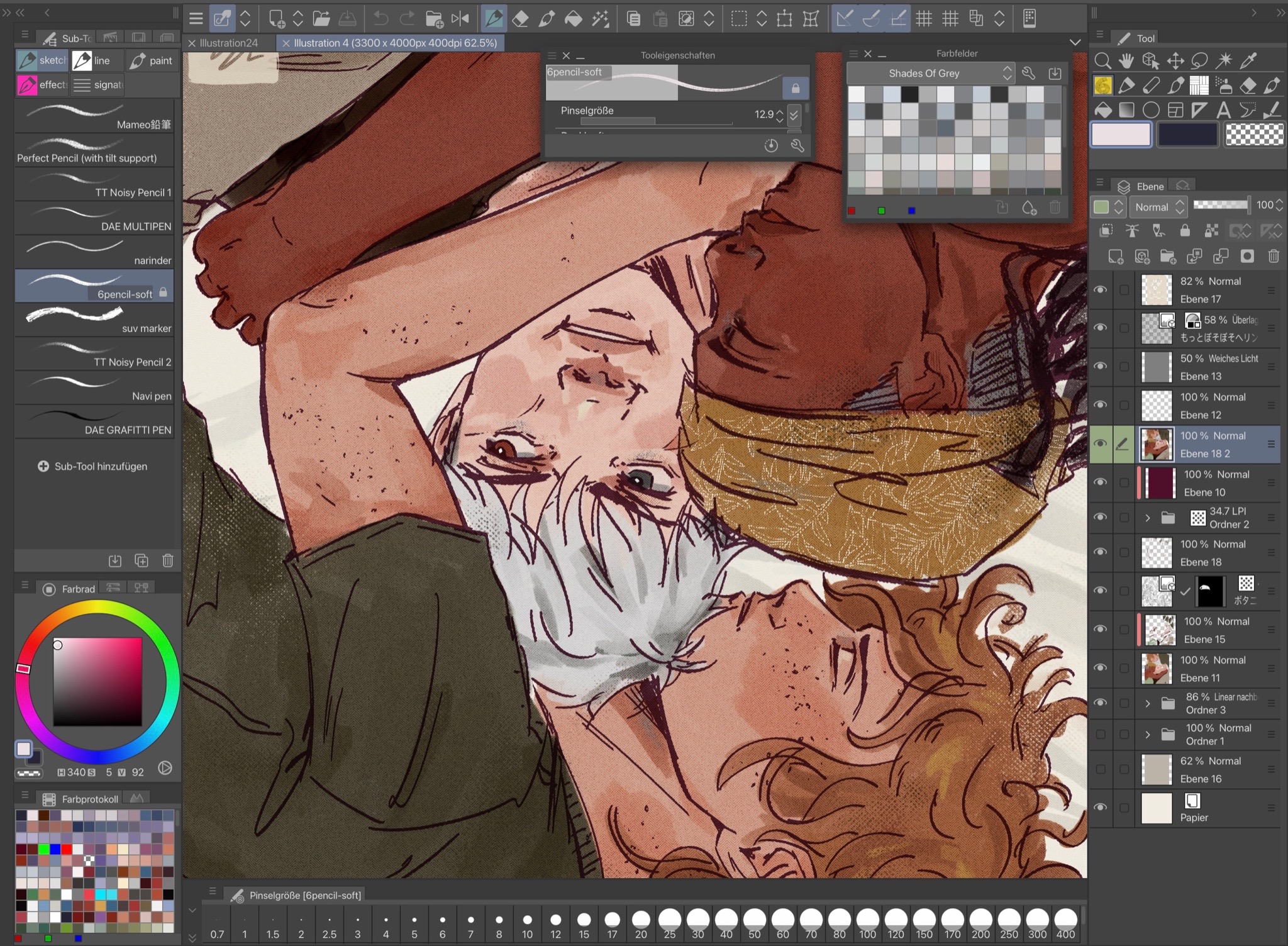
左側:サブツールウィンドウ(+オートアクションとナビゲータ)、カラーホイールとカラー履歴
右側:ツールとレイヤー(+レイヤーオプション)
左側の隠しタブ: >> で開くことができ、あなたの材料と履歴を表示します
フローティングウィンドウ:サブツール設定とカラーパレット[ふろーむぐう:さぶーぷれーとからーぱっと
一番上の行は、私が最も必要とするオプションと設定(ブラシグループ、消しゴム、キャンバスのサイズ変更、ぼかし、汚れ、色調整オプションなど)に合わせてパーソナライズされています。
the canvas is in the middle and brush size at the bottom.
left side: subtool window (+ auto action and navigator), colour wheel and colour history
right side: tools and layers (+ layer options)
hidden tabs on the left side: can be opened with the >> and shows your materials and history
floating windows: subtool settings and colour palette
the top row is also personalized to what options and settings i need most (brush groups, eraser, canvas resizing, blur, smudge, colour adjustment options, etc.)








"mistaekn"さんの別の素材


"ワークスペース"の人気素材


新着素材


バッジ
-
 MVP ◆質問に対して適切な回答を数多く投稿し、コミュニティの運営に大きく貢献したユーザーです。MVPは3ヶ月に一度、その間に獲得したポイントを元に決定し、表彰を行っています。
 -
 NVP (New Valuable Player) ◆MVPに次いでコミュニティの運営に貢献したユーザーです。これまでMVPの受賞経験のない方から、獲得したポイントを元に決定し、表彰を行なっています。
 -
 公式エキスパート ◆優れた回答者の証であるMVP受賞者の中からさらに選ばれた、コミュニティで最も優良な回答者の証です。審査を経て当社から依頼し就任いただいています。※旧名称「エバンジェリスト」
 -
 セルシス公認モデレーター ◆モデレーターは、日本語とその他の言語が話せるセルシス公認のスタッフです。ソフトウェアや創作のエキスパートではないので、直接疑問を解決することはできませんが、みなさんがスムーズにコミュニケーションできるように、言葉やコミュニケーションの側面からサポートします。
 -
 セルシス公式運営に関連した公式アカウントです。