


【48Hfree】Pack de poses femeninas de bust up 2.0 (【48Hfree】Female Bust Up Pose Pack 2.0) 【48Hfree】Female Bust Up Pose Pack 2.0
Content ID:2306727
-
412


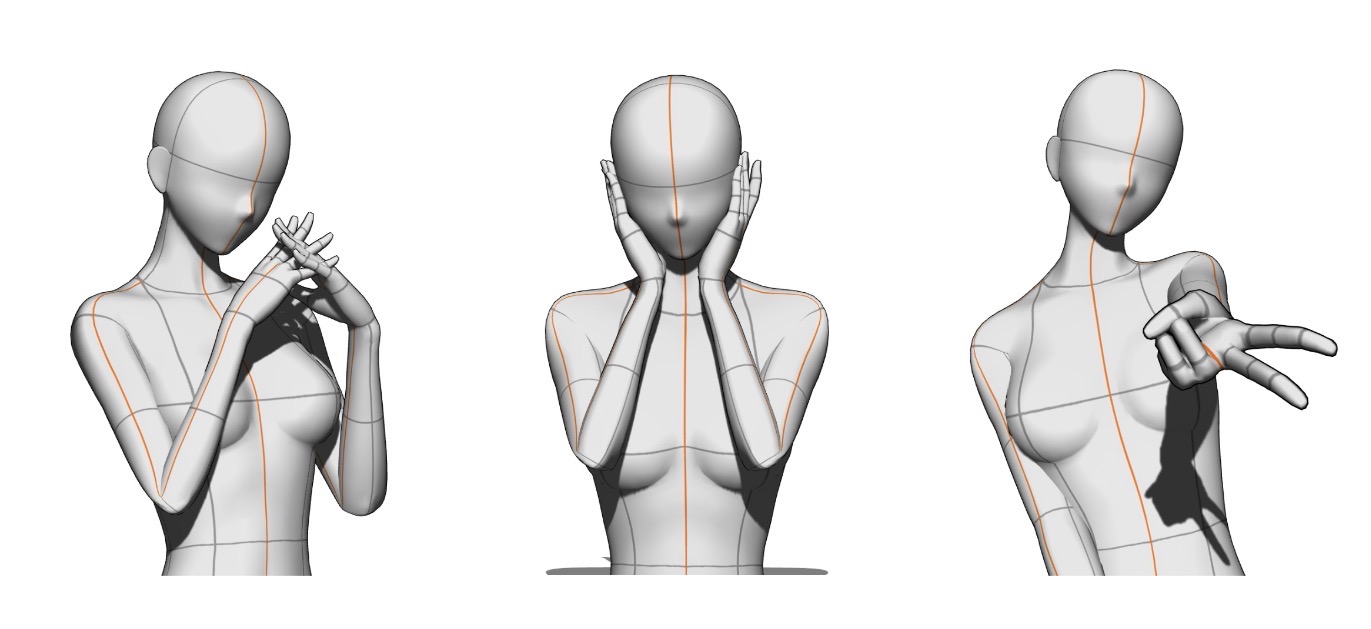
¡3 poses en total! 3 poses total!
Un conjunto de 3 poses de bust-up para dibujar personajes bonitos. Hice este pack porque me costaba encontrar poses bonitas que estuvieran optimizadas solo para ilustraciones de bust-up, así que hice algunas yo misma, ¡disfrutad!
Aviso: Las modelos se posaron haciendo zoom en el lienzo y enfocando la parte superior del cuerpo. Por lo tanto, no se tuvo en cuenta la parte inferior del cuerpo durante la pose. Lo mejor es hacer zoom en la vista de la cámara y enfocar solo la parte superior del cuerpo.
Sobre la postura GAL
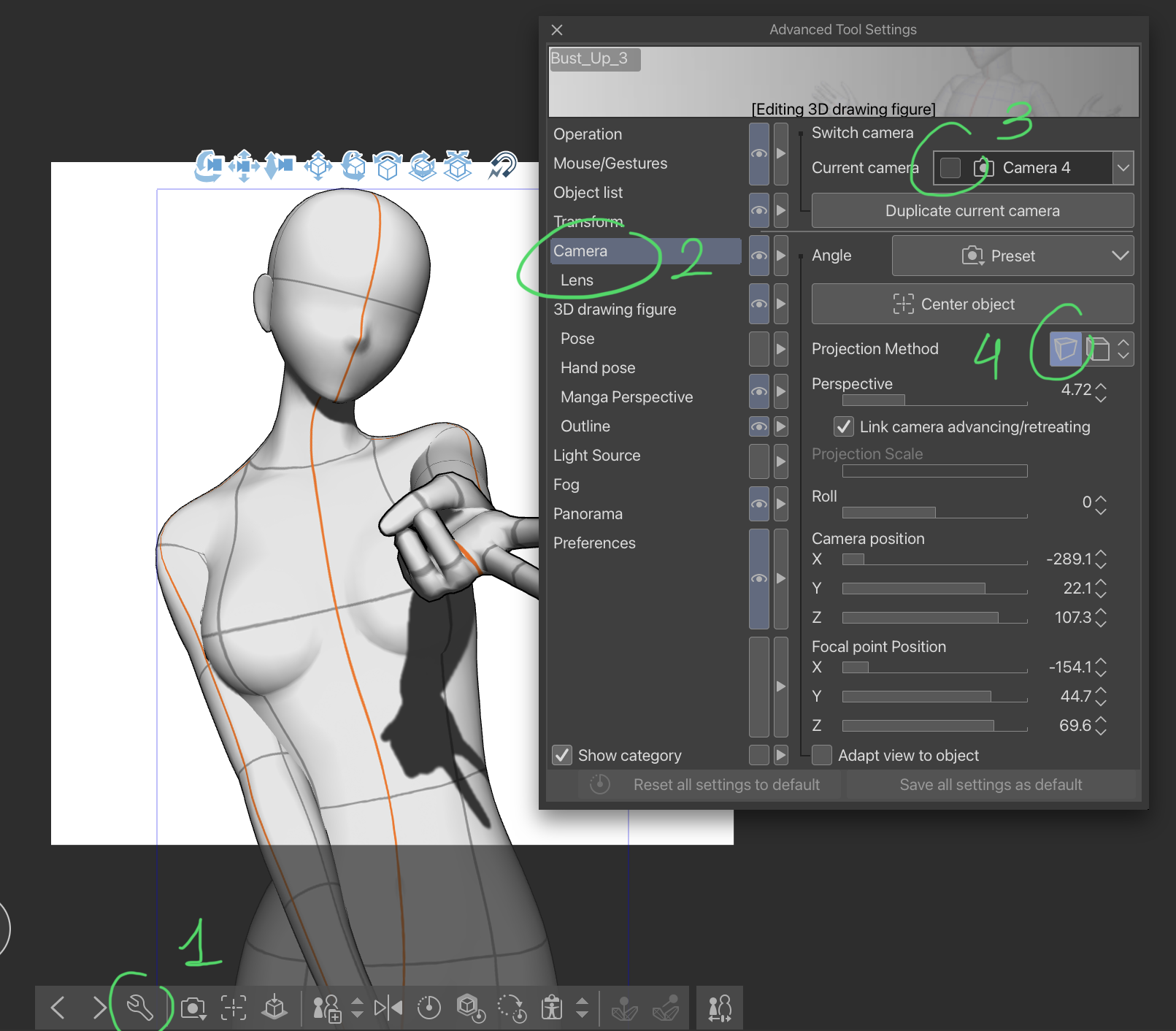
Si el modelo aparece con una mano más pequeña (la que hace el signo de paz al revés) pero preferirías que estuviera ampliado igual que en la imagen de arriba, sigue este sencillo tutorial para solucionarlo:
PASO 1: Toca el icono de la llave inglesa para abrir la ventana de "Configuración avanzada de herramientas".
PASO 2: Haz clic en el menú "Cámara".
PASO 3: Asegúrate de que tu cámara actual no esté bloqueada; si lo está, por favor apágala.
PASO 4: Toca este icono para cambiar a proyección en perspectiva y ¡listo!
A/N: Actualicé los materiales porque me pidieron cambiar a materiales de pose en lugar de materiales de imagen 3D. No fue posible actualizar el catálogo de material anterior, por lo que tuve que publicar uno nuevo, pido disculpas por las molestias.
A set of 3 bust-up poses for drawing pretty characters. I made this pack because I struggled to find cute poses that are optimized for bust-up only illustrations, so I made some myself, please enjoy!
Disclaimer: The models were posed by zooming in on the canvas and focusing on the upper body. Therefore, the lower body was not taken into account while posing. It is best to zoom in on the camera view and focus on the upper body only.
About the GAL pose
If the model appears with a smaller hand (the one making the upside-down peace sign) but you’d prefer it to be enlarged just like in the image shown above, do follow this simple tutorial to fix it:
STEP 1: Tap on the wrench icon to open the “Advanced Tool Settings” window.
STEP 2: Click on the “Camera” menu.
STEP 3: Ensure that your current camera is not locked, if it is, please turn it off.
STEP 4: Tap on this icon to switch to perspective projection, and you’re done!
A/N: Updated the materials as I was requested to switch to pose materials instead of 3D image materials. It was not possible to update the previous material catalog, therefore I had to publish a new one, I apologize for the inconvenience.
Posturas de Bust Up Bust Up Poses







Más materiales de mengli


Materiales populares de Catálogos de materiales


Nuevos materiales




Insignias
-
 MVP ◆Estos usuarios han contribuido en gran medida a la gestión de la comunidad, al publicar multitud de útiles respuestas a las preguntas planteadas. Una vez cada tres meses, los MVP son seleccionados en base a los puntos obtenidos durante ese período y, en consecuencia, son reconocidos por su esfuerzo.
 -
 New Valuable Player (NVP) ◆Son las personas que más han contribuido a la comunidad después de los MVP. Este galardón se otorga según los puntos conseguidos a los usuarios que aún no han obtenido ningún premio MVP.
 -
 Especialista oficial ◆Elegidos de entre todos los MVP, quienes ya han demostrado ser de inestimable ayuda, esto es un testimonio de su excepcional apoyo para con la comunidad. Tras un minucioso escrutinio, son nombrados por Celsys para ocupar dicho cargo.Nota: Anteriormente denominados "evangelistas".
 -
 Moderador oficial de Celsys ◆Los moderadores son miembros del personal de Celsys que pueden comunicarse en japonés y otros idiomas. No son expertos en software o ilustración, por lo que no pueden responder directamente a las preguntas. Sin embargo, tratarán de asegurarse de que la comunicación entre usuarios de distintas lenguas sea tan fluida y comprensible como sea posible.
 -
 Cuenta oficial de CelsysCuenta oficial del administrador