


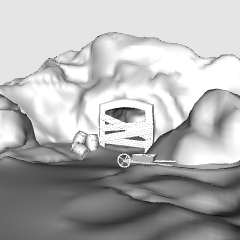
A versatile 3D model of a mine and cave entrance perfect for manga, webtoons, and illustrations. Designed with maximum flexibility, all man-made structures and props can be easily hidden or shown in Clip Studio. This allows you to instantly customize the asset to fit your story's context—whether you need a pure natural cave, an active bustling mine, or a spooky abandoned entrance.
Hi everyone!
Today, I’m excited to share my new 3D model that has been bouncing around in my head for a while. This time, it’s a Mine Entrance, which can easily be customized into a natural cave entrance. I designed this specifically to serve as the perfect companion and complement to the Cave model I released previously (Cave floor 1-JL). I hope it helps you bring your stories and backgrounds to life!
How to Use

1-Drag and Drop: Drag the 3D model from your material palette directly onto your canvas.
2-Select the Model: Click on the model using the Operation (Object) tool.
3-Customize the Scene: Go to the Tool Property palette or click the wrench icon to open the Sub Tool Detail window. Under the "Visibility" / "Layout" settings, you can check or uncheck the boxes for individual elements (such as tracks, wooden beams, or rocks) to instantly switch between a natural cave, an active mine, or an abandoned entrance.

Enjoy!


Background


Más materiales de Janlibell


Materiales populares de Catálogos de materiales


Nuevos materiales


Insignias
-
 MVP ◆Estos usuarios han contribuido en gran medida a la gestión de la comunidad, al publicar multitud de útiles respuestas a las preguntas planteadas. Una vez cada tres meses, los MVP son seleccionados en base a los puntos obtenidos durante ese período y, en consecuencia, son reconocidos por su esfuerzo.
 -
 New Valuable Player (NVP) ◆Son las personas que más han contribuido a la comunidad después de los MVP. Este galardón se otorga según los puntos conseguidos a los usuarios que aún no han obtenido ningún premio MVP.
 -
 Especialista oficial ◆Elegidos de entre todos los MVP, quienes ya han demostrado ser de inestimable ayuda, esto es un testimonio de su excepcional apoyo para con la comunidad. Tras un minucioso escrutinio, son nombrados por Celsys para ocupar dicho cargo.Nota: Anteriormente denominados "evangelistas".
 -
 Moderador oficial de Celsys ◆Los moderadores son miembros del personal de Celsys que pueden comunicarse en japonés y otros idiomas. No son expertos en software o ilustración, por lo que no pueden responder directamente a las preguntas. Sin embargo, tratarán de asegurarse de que la comunicación entre usuarios de distintas lenguas sea tan fluida y comprensible como sea posible.
 -
 Cuenta oficial de CelsysCuenta oficial del administrador
