



Efectos para añadir un aspecto más retro a tu arte Effects to add a more retro look to your art
(Lo que esperemos que sea la última y más refinada actualización de este set)
Múltiples acciones automáticas que pueden usarse para que tu arte parezca más retro. Recomiendo el material de ruido de 鮭とユッケ para poner encima el trabajo final sobre la configuración de capas con luz suave
(También hay "VHS Actions" de pigmafemale para efectos adicionales que pueden funcionar bien junto con estos)
(Consulta este hilo que he creado para más instrucciones sobre cómo funcionan esto y las acciones automáticas: https://twitter.com/reimidy/status/1283888437628743682)
Cada acción excepto el desenfoque de línea aplana la imagen por defecto, así que si quieres evitarlo, haz clic en la pantalla de lista y la acción justo después de aplanar imagen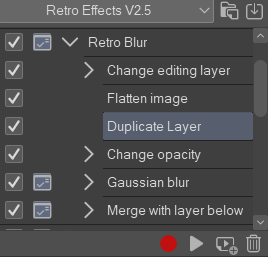


Múltiples acciones automáticas que pueden usarse para que tu arte parezca más retro. Recomiendo el material de ruido de 鮭とユッケ para poner encima el trabajo final sobre la configuración de capas con luz suave
(También hay "VHS Actions" de pigmafemale para efectos adicionales que pueden funcionar bien junto con estos)
(Consulta este hilo que he creado para más instrucciones sobre cómo funcionan esto y las acciones automáticas: https://twitter.com/reimidy/status/1283888437628743682)
Cada acción excepto el desenfoque de línea aplana la imagen por defecto, así que si quieres evitarlo, haz clic en la pantalla de lista y la acción justo después de aplanar imagen
Todas las acciones están listadas en el orden en que me gusta usarlas
Efecto de línea (versión tanto para capas raster como vectorial):

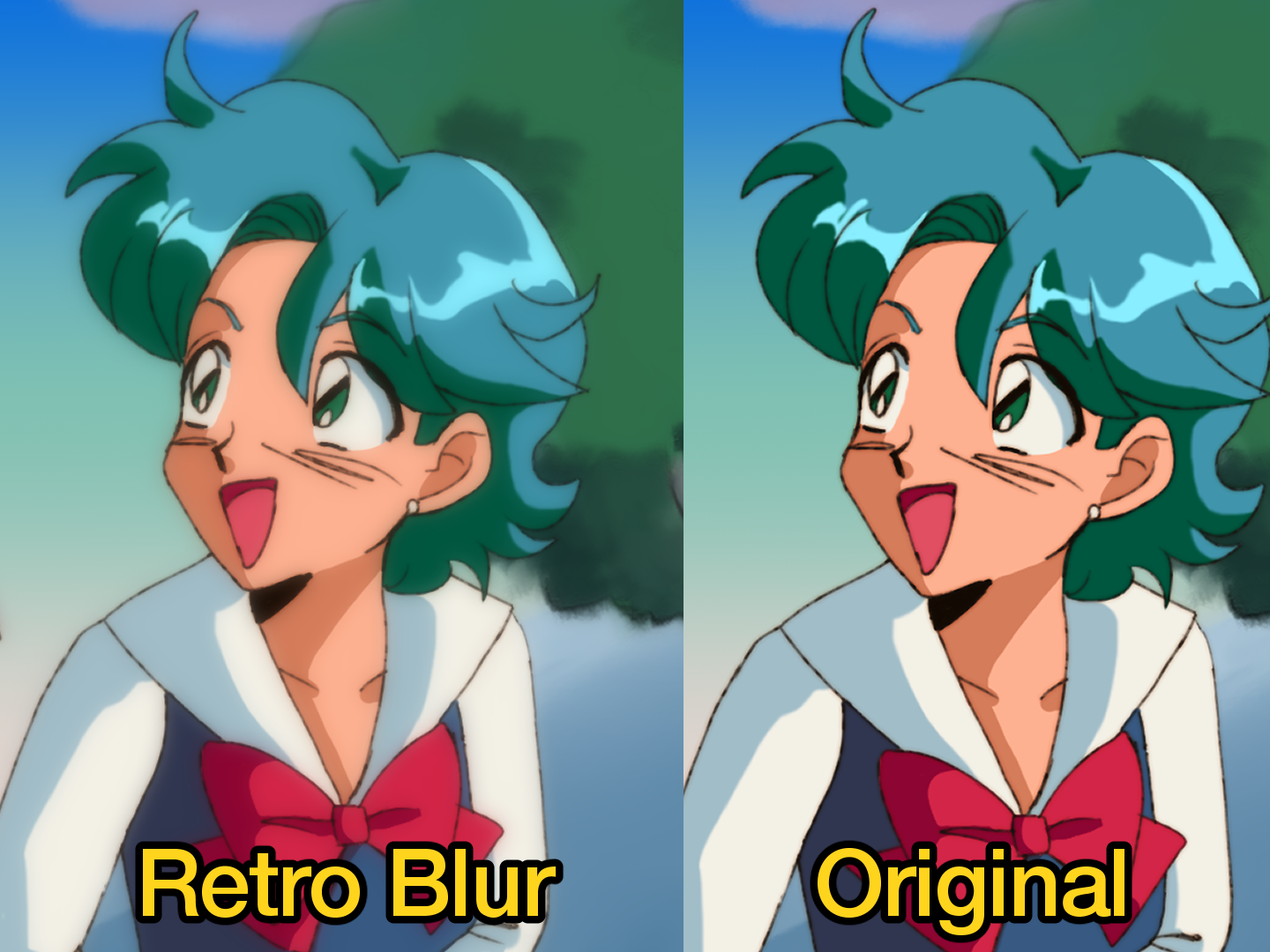
Retro Blur:
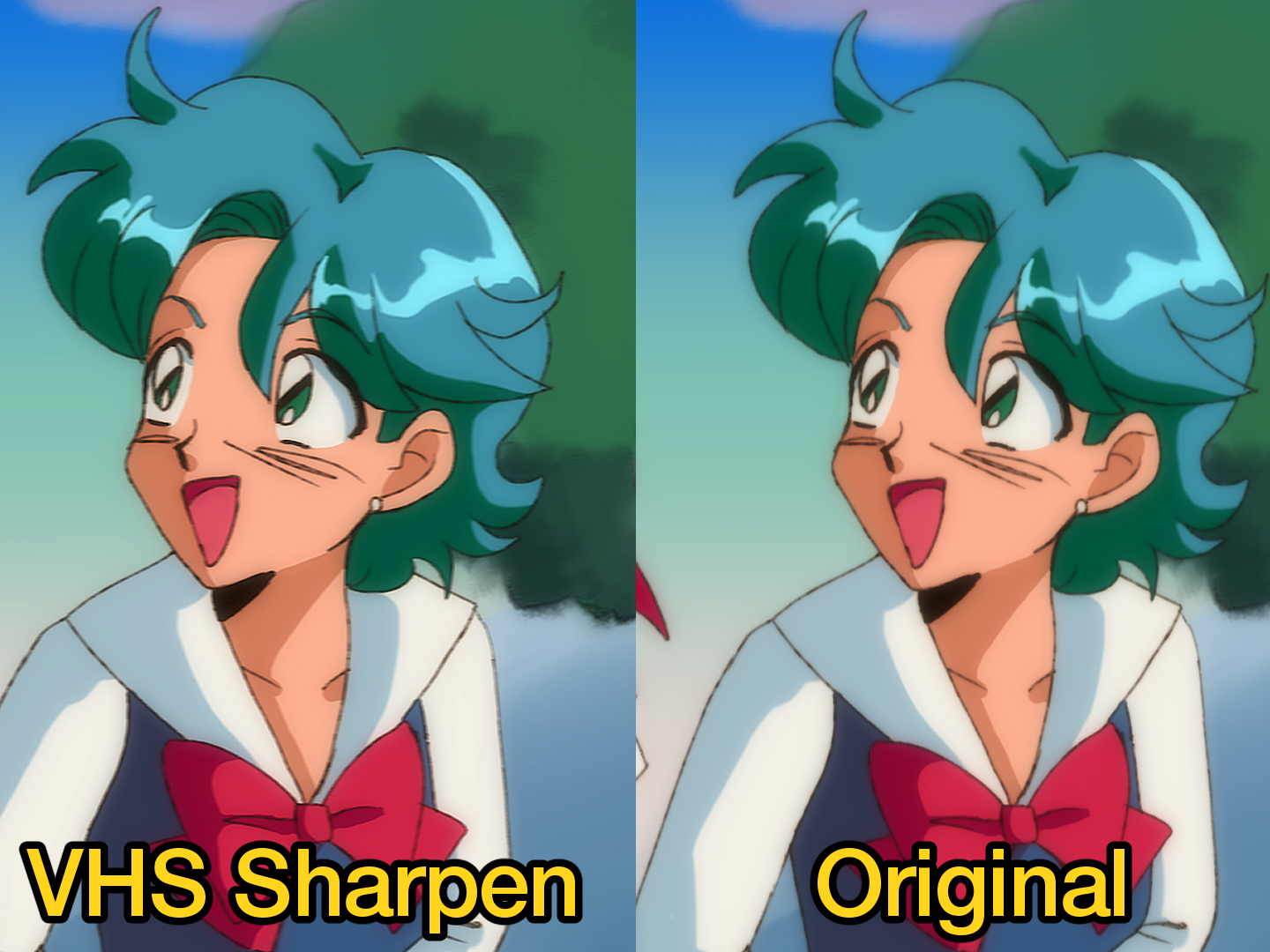
VHS Sharpen:
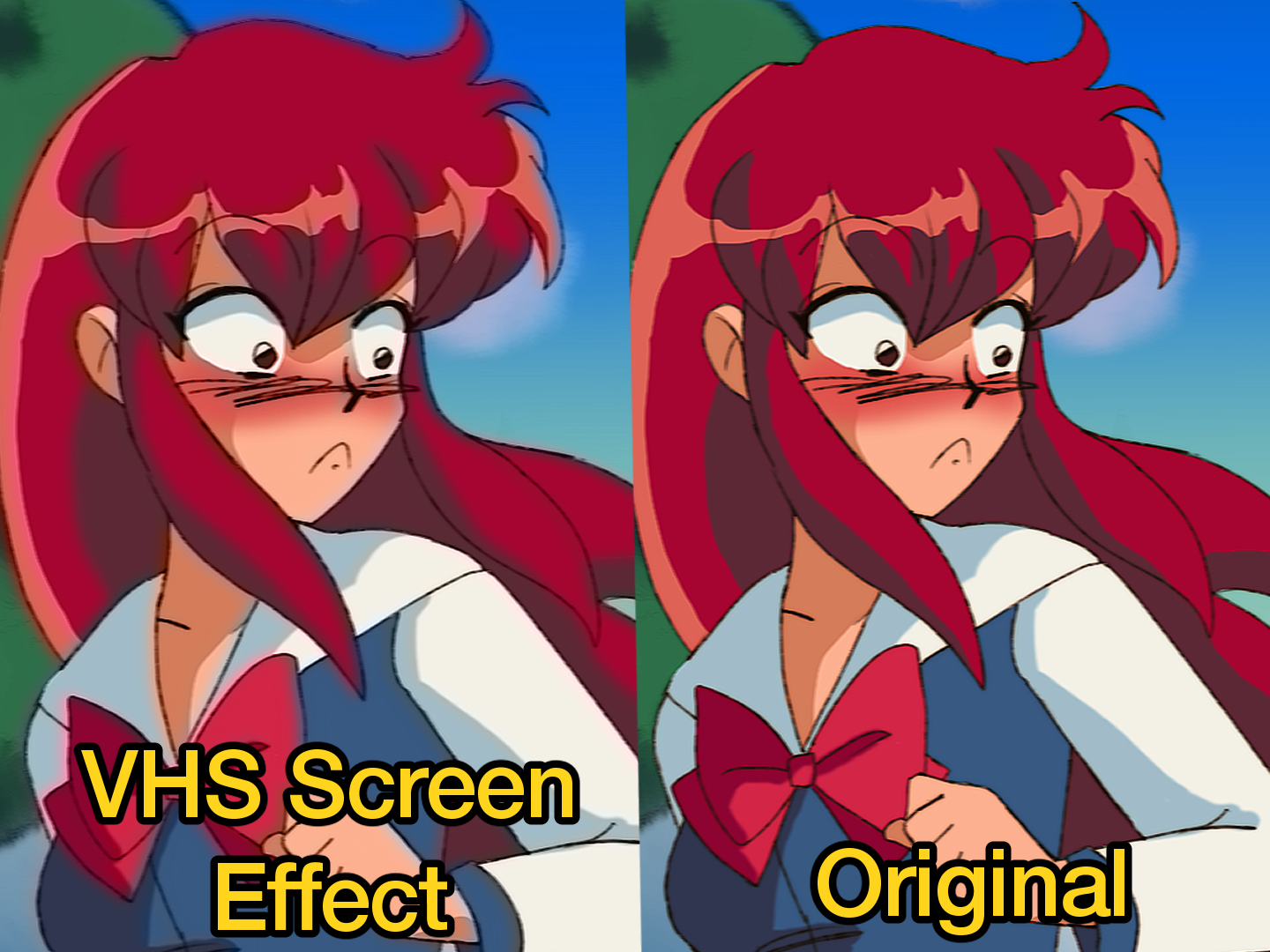
Efecto de pantalla VHS:
Acciones adicionales incluidas que añaden un tipo de efecto diferente que podrías tener en mente:
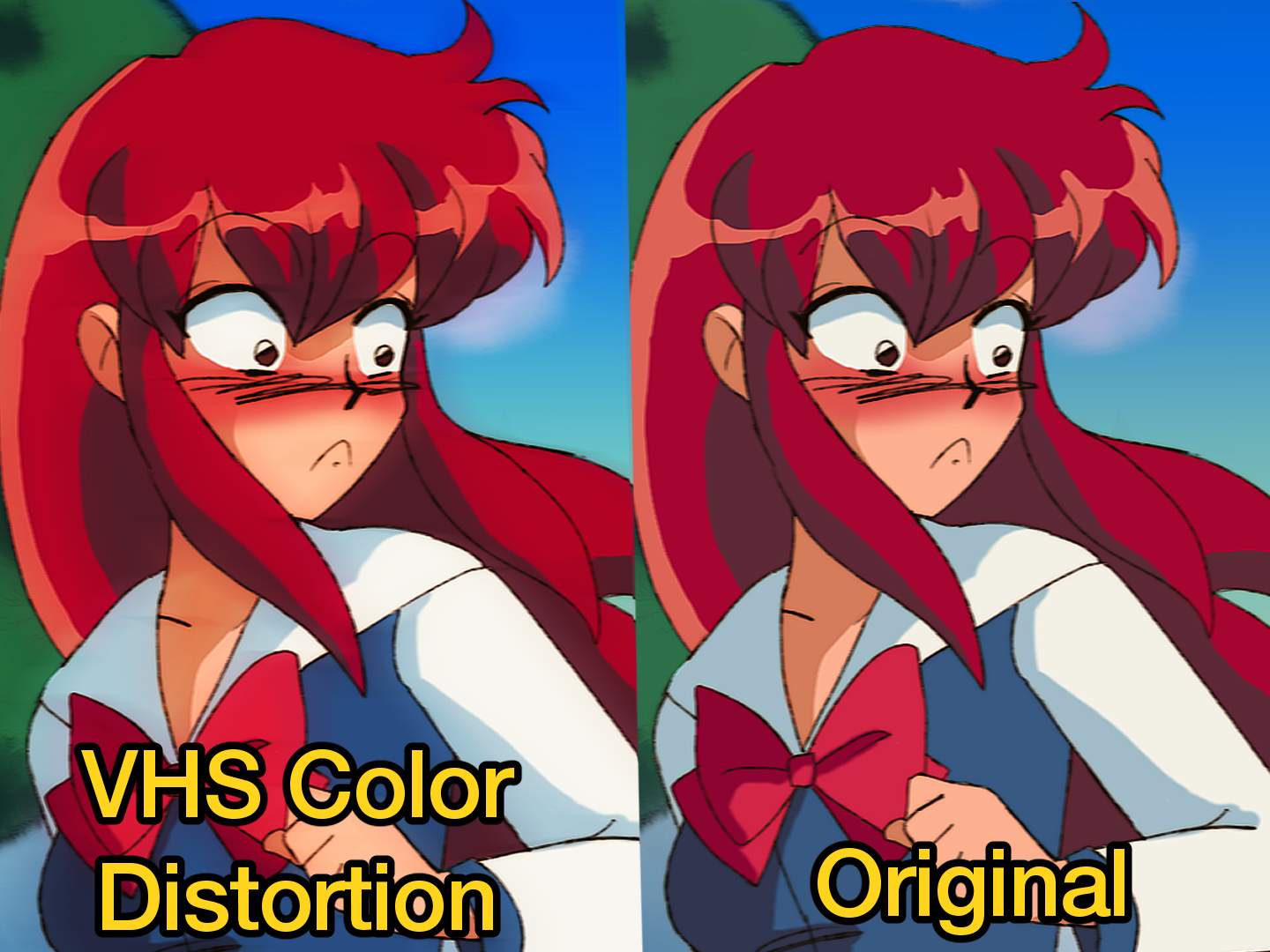
Distorsión de color en VHS:
Filtro de color (mucho más anticuado y solo funciona con ciertas ilustraciones en mi opinión):

(También ten en cuenta que la fuerza del desenfoque se puede ajustar a tu gusto en la mayoría de estas acciones)
(What should hopefully be the final and most refined update to this set)
Multiple auto actions that can be used to make your art look more retro. I recommend the noise material by 鮭とユッケ to put over top the final work on soft light layer setting
(there's also "vhs actions" by pigmafemale for additional effects that may work well along with these)
(Refer to this thread I made for further instructions on how this and auto actions work: https://twitter.com/reimidy/status/1283888437628743682)
Every action minus the Line blur flatten the image by default so if you wish to avoid that click the list screen and the action right after flatten image
Multiple auto actions that can be used to make your art look more retro. I recommend the noise material by 鮭とユッケ to put over top the final work on soft light layer setting
(there's also "vhs actions" by pigmafemale for additional effects that may work well along with these)
(Refer to this thread I made for further instructions on how this and auto actions work: https://twitter.com/reimidy/status/1283888437628743682)
Every action minus the Line blur flatten the image by default so if you wish to avoid that click the list screen and the action right after flatten image
All Actions are listed in order of how I like to use them
Line Effect (ver. for both raster and vector layers):
Retro Blur:
VHS Sharpen:
VHS Screen Effect:
Bonus actions included that add a different kind of effect you might have in mind -
VHS Color Distortion:
Color Filter (much more outdated and only works with certain illustrations in my opinion):
(Also note the blur strength can be adjusted to your liking in most of these actions as well)
Versión antigua










Más materiales de reimidy

Materiales populares de Acciones automáticas


Nuevos materiales


Insignias
-
 MVP ◆Estos usuarios han contribuido en gran medida a la gestión de la comunidad, al publicar multitud de útiles respuestas a las preguntas planteadas. Una vez cada tres meses, los MVP son seleccionados en base a los puntos obtenidos durante ese período y, en consecuencia, son reconocidos por su esfuerzo.
 -
 New Valuable Player (NVP) ◆Son las personas que más han contribuido a la comunidad después de los MVP. Este galardón se otorga según los puntos conseguidos a los usuarios que aún no han obtenido ningún premio MVP.
 -
 Especialista oficial ◆Elegidos de entre todos los MVP, quienes ya han demostrado ser de inestimable ayuda, esto es un testimonio de su excepcional apoyo para con la comunidad. Tras un minucioso escrutinio, son nombrados por Celsys para ocupar dicho cargo.Nota: Anteriormente denominados "evangelistas".
 -
 Moderador oficial de Celsys ◆Los moderadores son miembros del personal de Celsys que pueden comunicarse en japonés y otros idiomas. No son expertos en software o ilustración, por lo que no pueden responder directamente a las preguntas. Sin embargo, tratarán de asegurarse de que la comunicación entre usuarios de distintas lenguas sea tan fluida y comprensible como sea posible.
 -
 Cuenta oficial de CelsysCuenta oficial del administrador