



! ¡LEE LAS INSTRUCCIONES ANTES DE USARLAS!
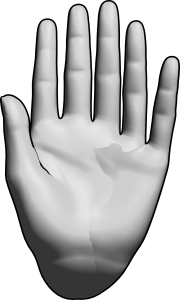
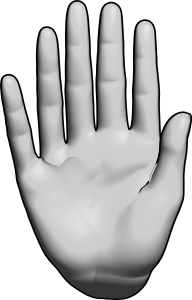
Estos modelos son para dibujar personajes con 6 dedos usando los modelos de manos integrados hechos por Clip Studio Paint
!READ INSTUCTIONS BEFORE USE!
These models are for drawing characters with 6 fingers using the build in hand models made by Clip Studio Paint
El primer paso es juntar las manos.

Arrastra "Básico - Izquierda 2" a "Básico izquierdo".

A continuación: cómo posar.
Se recomienda encarecidamente posar manualmente.
Herramientas integradas para la pose de mano no se recomiendan al 100%, pero siguen siendo útiles.
No se recomienda pegar las poses de las manos.
NO uses el escáner de mano, se romperá la pose.
Todos los dedos pueden desbloquearse cuando se selecciona la mano principal.


El único dedo que debe desbloquearse es el DEDO PINCHE cuando se selecciona la mano secundaria.


Personalización
Usar la batidora de mano está bien
Ajustar la longitud de los dedos no es 100% recomendable, pero sigue siendo útil.
Ajustar el tamaño de la palma no es 100% recomendable, pero sigue siendo útil.
No se recomienda habilitar la muñeca.
Todos los dedos pueden ajustarse cuando se selecciona la mano principal.
El único dedo que debe ajustarse es el DEDO PINCHO cuando se selecciona la mano secundaria.
Ejemplos


*Estas instrucciones fueron escritas originalmente en inglés y están siendo traducidas por una máquina, así que si las instrucciones parecen extrañas, es por eso.
The first step is to put the hands together.
Drag "Basic - Left 2" into "Basic Left".
Next up - How to pose it.
Manual posing is highly recommended.
Built-in Hand posing tools not 100% recommended but still useful.
Pasting hand poses are not recommended.
DO NOT use the hand scanner it will break the pose.
All fingers can be unlocked when the main hand is selected.
The only finger that should be unlocked is the PINKY FINGER when the secondary hand is selected.
Customization
Using the hand mixer is okay
Adjusting finger length is not 100% recommended but still useful.
Adjusting palm size is not 100% recommended but still useful.
Enabling wrist is not recommended.
All fingers can be adjusted when the main hand is selected.
The only finger that should be adjusted is the PINKY FINGER when the secondary hand is selected.
Examples
*These instructions were originally written in English and they are being translated by a machine so if the instructions seem odd that is why.
Polidactilia polydactyly


Más materiales de curtisCru


Materiales populares de Catálogos de materiales


Nuevos materiales




Insignias
-
 MVP ◆Estos usuarios han contribuido en gran medida a la gestión de la comunidad, al publicar multitud de útiles respuestas a las preguntas planteadas. Una vez cada tres meses, los MVP son seleccionados en base a los puntos obtenidos durante ese período y, en consecuencia, son reconocidos por su esfuerzo.
 -
 New Valuable Player (NVP) ◆Son las personas que más han contribuido a la comunidad después de los MVP. Este galardón se otorga según los puntos conseguidos a los usuarios que aún no han obtenido ningún premio MVP.
 -
 Especialista oficial ◆Elegidos de entre todos los MVP, quienes ya han demostrado ser de inestimable ayuda, esto es un testimonio de su excepcional apoyo para con la comunidad. Tras un minucioso escrutinio, son nombrados por Celsys para ocupar dicho cargo.Nota: Anteriormente denominados "evangelistas".
 -
 Moderador oficial de Celsys ◆Los moderadores son miembros del personal de Celsys que pueden comunicarse en japonés y otros idiomas. No son expertos en software o ilustración, por lo que no pueden responder directamente a las preguntas. Sin embargo, tratarán de asegurarse de que la comunicación entre usuarios de distintas lenguas sea tan fluida y comprensible como sea posible.
 -
 Cuenta oficial de CelsysCuenta oficial del administrador