


Configuración del modelo Vtuber para Live2D (Vtuber Model SetUp for Live2D) Vtuber Model SetUp for Live2D
Content ID:2252285
-
170


Plantilla para la configuración de las capas en Live2D Template for the layers's configuration for Live2D
Esta es una plantilla de capas codificadas por colores que me hice, porque prefiero tener mis capas con colores, ¡ya que me resulta más fácil encontrar lo que quiero!


¿QUÉ HACE ESTE MATERIAL?
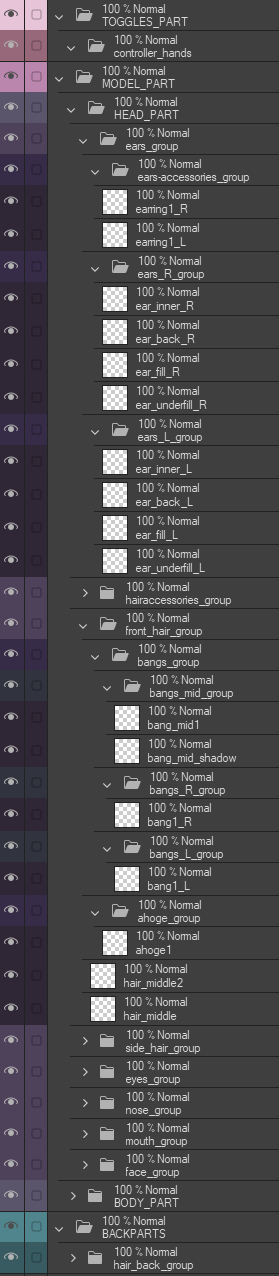
Esta plantilla añade a tu ilustración varias carpetas, subcarpetas y capas para ayudarte a superponer tu modelo VTuber y prepararlo para el rigging.
Se divide en tres categorías principales :
- Alternar | Rosa claro
- Carrocería | Morado
- Parte trasera | Verde pato
Tanto las carpetas como capas están bien definidas para el Rigging Live2D
Todas son capas vacías , he insertado las capas más básicas , puedes añadir y eliminar capas y carpetas cuando quieras,
Solo recuerda no dejar espacio en el nombre de tu capa, porque Live2D eliminará el nombre y lo reemplazará por "ArtMesh".
Los subrayos son tus mejores aliados :3
La colocación de la "R" y la "L" cambian según la preferencia del artista y del rigger, yo, personalmente, prefiero la mía al final, así que todas están al final del nombre.
Las carpetas principales están en mayúsculas, las subcarpetas y el nombre de las capas están en minúsculas.
Hay cuatro capas creadas para borrar o desactivar para Live2D.
- Capas de fatiga visual: Una capa para ayudar con la fatiga visual causada por la pantalla
- R y L: Una capa con "R" y "L" escritas en cada lado de la página, para ayudarte a recordar cuál es el lado derecho y el izquierdo de tu modelo de Vtuber
- Relleno verde: Una capa para ayudarte a encontrar manchas de color para borrar
- Relleno negro: Una capa para ayudarte a encontrar un punto de color para borrar
¿CÓMO MONTAR?
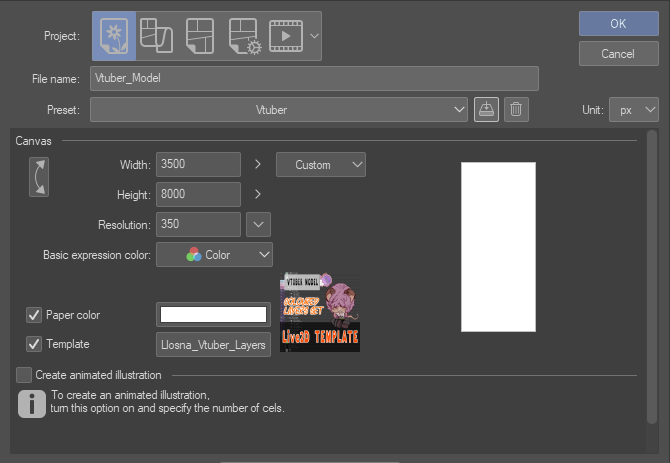
Puedes añadirlo primero haciendo clicen g en el botón "plantilla" y buscándolo desde "material descargado" o escribiendo "LLOSNA" en la opción de búsqueda
O arrastrándolo a tus capas, desde tus materiales.

Así es como se ve cuando lo añades:
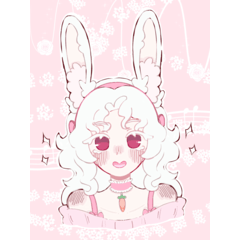
Y así es como queda cuando terminas con tu modelo
(Tomado de mi antiguo modelo Vtuber):

¡Esto debería darte una buena base para enviar tu modelo a rigging!
¡Y no olvides crear SIEMPRE una página en alta resolución!
Siempre es más fácil bajar que subir.
¡Diviértete!
This is a colour coded layers template I made for myself, because I prefer to have my layers with colours, as it is easier for me to find what I want !
WHAT DOES THIS MATERIAL DO ?
This template add to your illustration, multiple nammed folders, subfolders and layers to help you layer your VTuber Model to make it ready for Rigging.
It is separated in three main categories :
- Toggle | Light Pink
- Body | Purple
- BackPart | Duck green
Each folders and layers are nammed for Live2D Rigging in mind
They are all empty layers, I inserted the most basic layers, you can add and remove layers and folders as your heart content,
Just remember to not leave space in your layer's name, because Live2D will remove the name and replace it with "ArtMesh".
Underscore are your best friend :3
The placement of "R" and "L" switch depending of artist's and rigger's preference, I, personally, prefer mine at the end, so they all are at the end of the name.
The main folder are in uppercase, the subfolders as well as layers's name are in lowercase.
There are four layers created to either erase, or toggle off for Live2D.
- Eye-strain layers : A layer to help with the eye strain from the screen
- R and L : A Layer with "R" and "L" written on each side of the page, to help you remember which side is the right and left for your Vtuber Model
- Green fill : A layer to help you find colour spot to erase
- Black fill : A layer to help you find colour spot to erase
HOW TO SET UP ?
You can add it first by clicking on the "template" button and searching it from "downloaded material"or writing "LLOSNA" in the search option
Or by dragging it to your layers, from your materials.
This is how it looks when you add it :
And this is how it looks once you are done with your model
(Taken from my old Vtuber Model) :
This should give you a good base for sending your model to rigging !
And don't forget to ALWAYS create a page in high resolution !
It's always easier to go down than up.
Have fun !





Más materiales de Llsona

Materiales populares de Plantillas de capas


Nuevos materiales


Insignias
-
 MVP ◆Estos usuarios han contribuido en gran medida a la gestión de la comunidad, al publicar multitud de útiles respuestas a las preguntas planteadas. Una vez cada tres meses, los MVP son seleccionados en base a los puntos obtenidos durante ese período y, en consecuencia, son reconocidos por su esfuerzo.
 -
 New Valuable Player (NVP) ◆Son las personas que más han contribuido a la comunidad después de los MVP. Este galardón se otorga según los puntos conseguidos a los usuarios que aún no han obtenido ningún premio MVP.
 -
 Especialista oficial ◆Elegidos de entre todos los MVP, quienes ya han demostrado ser de inestimable ayuda, esto es un testimonio de su excepcional apoyo para con la comunidad. Tras un minucioso escrutinio, son nombrados por Celsys para ocupar dicho cargo.Nota: Anteriormente denominados "evangelistas".
 -
 Moderador oficial de Celsys ◆Los moderadores son miembros del personal de Celsys que pueden comunicarse en japonés y otros idiomas. No son expertos en software o ilustración, por lo que no pueden responder directamente a las preguntas. Sin embargo, tratarán de asegurarse de que la comunicación entre usuarios de distintas lenguas sea tan fluida y comprensible como sea posible.
 -
 Cuenta oficial de CelsysCuenta oficial del administrador