


Gradiente de Perturbaciones de IA (AI Disturbance Gradient) AI Disturbance Gradient
Content ID:2250089
-
933


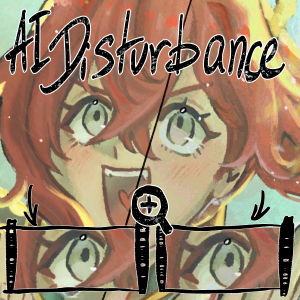
Últimamente me siento más ansiosa a la hora de subir mi arte a Instagram o TikTok, pero siempre he sido demasiado perezosa para intentar encontrar una superposición de imagen, descargar nightshade o crear una imagen material yo misma, así que hice un degradado en su lugar.
Vi cómo ibis paint y artistas en internet lo hacían, así que me inspiré en ellos.
I've been feeling more anxious about posting my art online to instagram or tiktok nowadays, but I was always too lazy to try to find a image overlay, download nightshade, or make a material image myself, so I made a gradient instead.
I saw how ibis paint and artists online did it so I took some inspiration from them.
 Se puede ver que hay algunos cambios, pero los cambios no son muy grandes :)
 Personalmente creo que el 5% queda mejor que el 10% porque quiero que sea lo más invisible posible, pero mostré un 10% solo para mostrar cómo se ve realmente cuando es más visible.


 You can see there's some changes, but the changes aren't very big :) I personally think 5% looks better than 10% since I want it to be as invisible as possible, but I showed 10% just to show how it actually looks when it's more visible.
Pendiente Gradient








Más materiales de Danabochi


Materiales populares de Catálogos de materiales


Nuevos materiales




-
 MVP ◆Estos usuarios han contribuido en gran medida a la gestión de la comunidad, al publicar multitud de útiles respuestas a las preguntas planteadas. Una vez cada tres meses, los MVP son seleccionados en base a los puntos obtenidos durante ese período y, en consecuencia, son reconocidos por su esfuerzo.
 -
 New Valuable Player (NVP) ◆Son las personas que más han contribuido a la comunidad después de los MVP. Este galardón se otorga según los puntos conseguidos a los usuarios que aún no han obtenido ningún premio MVP.
 -
 Especialista oficial ◆Elegidos de entre todos los MVP, quienes ya han demostrado ser de inestimable ayuda, esto es un testimonio de su excepcional apoyo para con la comunidad. Tras un minucioso escrutinio, son nombrados por Celsys para ocupar dicho cargo.Nota: Anteriormente denominados "evangelistas".
 -
 Moderador oficial de Celsys ◆Los moderadores son miembros del personal de Celsys que pueden comunicarse en japonés y otros idiomas. No son expertos en software o ilustración, por lo que no pueden responder directamente a las preguntas. Sin embargo, tratarán de asegurarse de que la comunicación entre usuarios de distintas lenguas sea tan fluida y comprensible como sea posible.
 -
 Cuenta oficial de CelsysCuenta oficial del administrador