


[GRATIS] 5_FRAMES PLANTILLA / TIRA CÓMICA ([FREE] 5_FRAMES TEMPLATE / COMIC STRIPE) [FREE] 5_FRAMES TEMPLATE / COMIC STRIPE
Content ID:2239975
-
1 012


Plantilla de enmarcado con carpetas y capas separadas para mayor comodidad, fácil de usar para tiras cómicas o composiciones. Framing Template with folders and layers separated for convenience, easy use for Comic Stripes or Compositions.
Plantilla de enmarcado con carpetas y capas separadas para mayor comodidad y fácil uso. [Para tiras cómicas o composiciones]
*(ACTUALIZADO por las directrices de publicación)
1. Selecciona tu proyecto de lienzo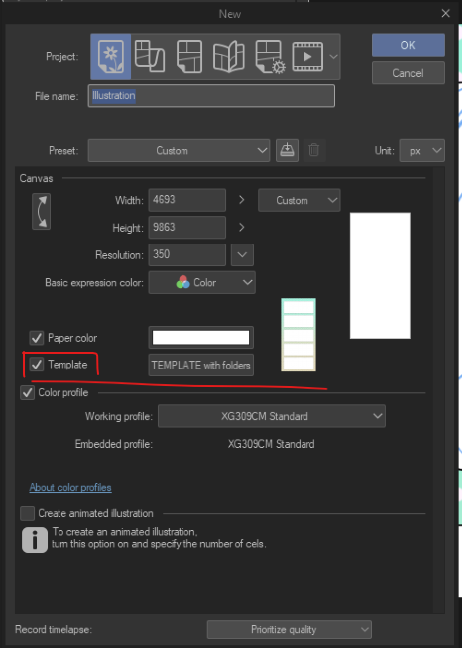
En "Plantilla" comprueba si el tuyo está marcado; si es así, procede a buscar.
2. Buscar la etiqueta "5_frames" o "plantilla".
3. Hay 5 marcos y cada uno tiene su carpeta respectiva concolors.
Cada carpeta tiene el borde del marco, el fondo del marco y una carpeta para Lineart.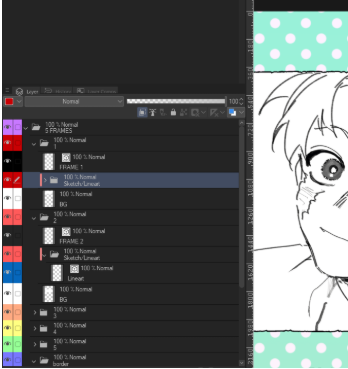
4. En la última carpeta (la morada) puedes ir a la capa correspondiente del Mapa de Degradado y cambiar los colores de fondo a tu gusto.
>>Aviso legal: Si ya descargaste el anterior, siento las molestias... Ahora están eliminados por las directrices de publicación. Así que lo revisé y lo estoy volviendo a publicar, no estoy seguro de si el moderador también eliminará este (por cualquier motivo), pero YO TENGO estas ilustraciones que aparecen abajo. Así que si vuelven a retirar, lo siento :( (de verdad espero que no lo hagan<<<
**Ejemplos de cómo puedes usar**


>>Puedes usarlo para Estudios de Composición, Divertidas Tiras de Cómic o lo que te apetezca.
Puede que me falte algo, pero espero que te guste y que también te pueda ser útil. :) <<
Puede que me falte algo, pero espero que te guste y que también te pueda ser útil. :) <<
Framing Template with folders and layers separated for convenience and easy use. [For Comic Stripes or Compositions]
*(UPDATED because of posting guidelines)
1. Select your Canvas Project
In "Template" check if yours is marked, if so then proceed to search.
2. Search for "5_frames"tag or "template".
3. There are 5 frames and each of them have their respective folders with colors.
Each folder has the frame border, the frame background and a folder for Lineart.
4. In the last folder (the purple one) you can go in the respective Gradient Map layer and change the background colors to your liking.
>>Disclaimer: If tou already download the previous one, Im sorry for the inconvenience... they are deleted now because of posting guidelines. So I revised and im reposting it again, im not sure if the moderator will take this one down too (for whatever reason) but I OWN these arts below. So if they take down again, I'm sorry :(( I really hope they won't.<<<
**Examples of how you can use**
>>You can Use it for Compositions Studies, Fun Comics Stripes or whatever you feel like it.
I may be lacking, but I hope you like it and it can be helpful to you as well. :) <<
I may be lacking, but I hope you like it and it can be helpful to you as well. :) <<


Materiales populares de Plantillas de capas


Nuevos materiales





Insignias
-
 MVP ◆Estos usuarios han contribuido en gran medida a la gestión de la comunidad, al publicar multitud de útiles respuestas a las preguntas planteadas. Una vez cada tres meses, los MVP son seleccionados en base a los puntos obtenidos durante ese período y, en consecuencia, son reconocidos por su esfuerzo.
 -
 New Valuable Player (NVP) ◆Son las personas que más han contribuido a la comunidad después de los MVP. Este galardón se otorga según los puntos conseguidos a los usuarios que aún no han obtenido ningún premio MVP.
 -
 Especialista oficial ◆Elegidos de entre todos los MVP, quienes ya han demostrado ser de inestimable ayuda, esto es un testimonio de su excepcional apoyo para con la comunidad. Tras un minucioso escrutinio, son nombrados por Celsys para ocupar dicho cargo.Nota: Anteriormente denominados "evangelistas".
 -
 Moderador oficial de Celsys ◆Los moderadores son miembros del personal de Celsys que pueden comunicarse en japonés y otros idiomas. No son expertos en software o ilustración, por lo que no pueden responder directamente a las preguntas. Sin embargo, tratarán de asegurarse de que la comunicación entre usuarios de distintas lenguas sea tan fluida y comprensible como sea posible.
 -
 Cuenta oficial de CelsysCuenta oficial del administrador