


ANIMACIÓN AUTOMÁTICA PACK de Panda (Panda's ANIMATION Auto-Action PACK) Panda's ANIMATION Auto-Action PACK
Content ID:2237670
-
263


EL PANDA VOLADOR AQUÍ
(resumen: al final)

Formulario de carpeta Pands
Hacia el rough
- Yo uso esta acción automática configurándola en un atajo de teclado y poniéndola F5. Yo suelo usar más "F5 TODAS CAPAS" que una sola capa, pero depende de ti.
- Es simplemente "Insertar Marco" pero sin todo el detalle complicado. Solo pulsa un botón.

*¿Por qué carpetas?

Gracias por usar este pack :D
Hice estas acciones automáticas para mí, y al cabo de un tiempo me di cuenta... ¿Por qué no os las regalo si me han ayudado muchísimo?
Hice estas acciones automáticas para mí, y al cabo de un tiempo me di cuenta... ¿Por qué no os las regalo si me han ayudado muchísimo?
Aquí tienes un resumen de lo que hacen estas herramientas:
LIENZO DE PANDA
LIENZO DE PANDA
- Al principio de una animación, uso esto solo para preparar mi lienzo.
(No uso mucho esto, solo está aquí por diversión.)
Formulario de carpeta Pands
- Mi pan de cada día.
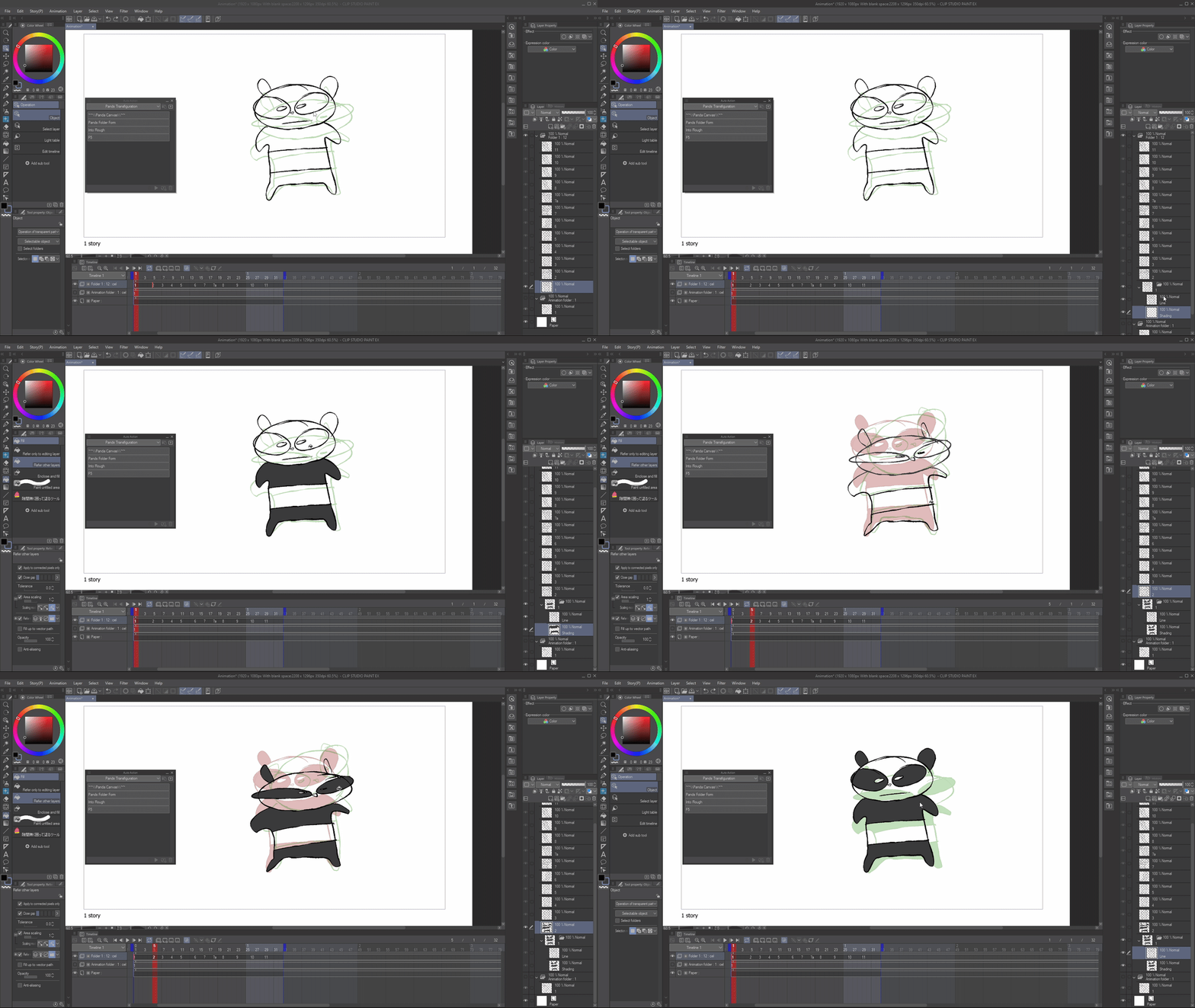
- A veces animo los bocetos directos en una sola capa. "Pands Folder Form", y convierte instantáneamente el Single Frame en una Carpeta* llamada: 'Line' y 'Shading'.
- GENIAL para animaciones rápidas, roughs y animatics. Si olvido configurar carpetas, uso esta acción automática.
(Me gusta mucho usarla con la herramienta de relleno de helado (ID de contenido:1759448))
Hacia el rough
- Forma de carpeta, pero en vez de línea, lo convierte en un rudo, por si querías delinearlo. No suelo usar esto, es solo un experimento.
F5 + F5 Todas las Capas
- F5 es un atajo de teclado común de Adobe Animate para aumentar los fotogramas.
- Yo uso esta acción automática configurándola en un atajo de teclado y poniéndola F5. Yo suelo usar más "F5 TODAS CAPAS" que una sola capa, pero depende de ti.
- Es simplemente "Insertar Marco" pero sin todo el detalle complicado. Solo pulsa un botón.

*¿Por qué carpetas?
El anime suele usar carpetas y es bueno acostumbrarse a usarlas.
Resumen:
Yo uso más 'Formulario de carpeta de Pands' y 'F5 Todas las Capas'.
Yo uso más 'Formulario de carpeta de Pands' y 'F5 Todas las Capas'.
Los otros son solo por diversión.
Espero que esto te haya inspirado a probar a crear tus propias acciones automáticas y divertirte con animaciones :D
THEFLYINGPANDA HERE
(tldr: at the end)
Pands Folder Form
Into Rough
- I use this auto action by setting it to a keyboard shortcut, and making it F5. I tend to use "F5 ALL LAYER" more than single layer but, it's up to you.
- It is simply "Insert Frame" but without all the finicky stuff. Just press a button.
*Why folders?
Thanks for using this pack :D
I made these auto actions for myself, and after a while I realised... why not give them out to you guys since they've helped me so much!
I made these auto actions for myself, and after a while I realised... why not give them out to you guys since they've helped me so much!
Here's a run down of what these do:
PANDA CANVAS
PANDA CANVAS
- At the beginning of an animation, I use this just to set up my canvas.
(I don't really use this much, it's just here for fun.)
Pands Folder Form
- My Bread and Butter.
- I sometimes just animate straight ahead roughs on 1 layer. "Pands Folder Form", and it instantly makes the Single Frame into a Folder* named: 'Line' and 'Shading'.
- GREAT for quick anims, roughs and animatics. If I forget to set up folders, I use this auto action.
(I really like to use this with the Ice Cream Fill Tool (Content ID:1759448))
Into Rough
- Folder Form but instead of line, it turns it into a rough, incase you wanted to line it. I don't really use this, it's just an experiment.
F5 + F5 All Layer
- F5 is a common Adobe Animate keyboard shortcut to increase frames.
- I use this auto action by setting it to a keyboard shortcut, and making it F5. I tend to use "F5 ALL LAYER" more than single layer but, it's up to you.
- It is simply "Insert Frame" but without all the finicky stuff. Just press a button.
*Why folders?
Anime often uses Folders and it's good to get into the habit of using folders.
TLDR:
I use 'Pands Folder Form' and 'F5 All Layers' the most.
I use 'Pands Folder Form' and 'F5 All Layers' the most.
The others are just for fun.
I hope this inspired you to try making your own auto actions and having fun with animation :D








Más materiales de TheFlyingPanda

Materiales populares de Acciones automáticas


Nuevos materiales





Insignias
-
 MVP ◆Estos usuarios han contribuido en gran medida a la gestión de la comunidad, al publicar multitud de útiles respuestas a las preguntas planteadas. Una vez cada tres meses, los MVP son seleccionados en base a los puntos obtenidos durante ese período y, en consecuencia, son reconocidos por su esfuerzo.
 -
 New Valuable Player (NVP) ◆Son las personas que más han contribuido a la comunidad después de los MVP. Este galardón se otorga según los puntos conseguidos a los usuarios que aún no han obtenido ningún premio MVP.
 -
 Especialista oficial ◆Elegidos de entre todos los MVP, quienes ya han demostrado ser de inestimable ayuda, esto es un testimonio de su excepcional apoyo para con la comunidad. Tras un minucioso escrutinio, son nombrados por Celsys para ocupar dicho cargo.Nota: Anteriormente denominados "evangelistas".
 -
 Moderador oficial de Celsys ◆Los moderadores son miembros del personal de Celsys que pueden comunicarse en japonés y otros idiomas. No son expertos en software o ilustración, por lo que no pueden responder directamente a las preguntas. Sin embargo, tratarán de asegurarse de que la comunicación entre usuarios de distintas lenguas sea tan fluida y comprensible como sea posible.
 -
 Cuenta oficial de CelsysCuenta oficial del administrador