


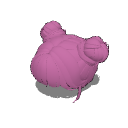
Doppelter Dutt 3D-Haare mit Pony (Double Bun 3D Hair with Bangs) Double Bun 3D Hair with Bangs
Content ID:2316026
-
30


Ich habe die Größe des Haarmaterials sorgfältig in Blender angepasst und zahlreiche Feinjustierungen vorgenommen, damit es perfekt am Kopf sitzt. Es ist einsatzbereit, sodass Sie es mit Zuversicht genießen können, weil alles auf die beste Passform abgestimmt wurde!

Vergiss nicht, das Material am Kopf zu befestigen!
Schritt 1: Importiere deine 3D-Figur auf die Leinwand.
Schritt 2: Mit ausgewählter 3D-Figur (auf derselben Schicht) importiere dein Haarmaterial. Mach dir keine Sorgen, wenn das Material weit entfernt von der Figur spawnt; Geh einfach zum nächsten Schritt weiter.

Schritt 3: Klicken Sie auf das Schraubenschlüssel-Symbol, um die Palette Sub Tool Detail zu öffnen und zum Reiter Objektliste zu gelangen.

Schritt 4: Ziehe und lasse das Haarmaterial auf die 3D-Figur in der Liste fallen, um daraus eine Kindschicht zu machen.

Schritt 5: Erweitern Sie das Menü Anhängungspunkte direkt unten und wählen Sie Kopf.

Das Haar richtet sich automatisch mit dem Kopf aus.
Da das Haar nun an der Figur befestigt ist, folgt es nahtlos dem Kopf, egal welche Pose man anwendet.
I carefully adjusted the hair material’s size in Blender and made numerous fine-tunings to ensure it fits perfectly when attached to the head. It’s ready to use, so you can enjoy it with confidence knowing everything has been fine-tuned for the best fit!
Don’t forget to attach the material to the head!
Step 1: Import your 3D figure onto the canvas.
Step 2: With your 3D figure selected (on the same layer), import your hair material. Don't worry if the material spawns far away from the figure; just proceed to the next step.
Step 3: Click the wrench icon to open the Sub Tool Detail palette and navigate to the Object list tab.
Step 4: Drag and drop the hair material onto the 3D figure in the list to make it a child layer.
Step 5: Expand the Attachment point menu directly below and select Head.
The hair will automatically align with the head.
Since the hair is now attached to the figure, it will follow the head seamlessly no matter what pose you apply.
Material Material


Weitere Materialien von suna.art


Beliebte Materialien zu „3D-Objekt“


Neue Materialien






Abzeichen
-
 MVP ◆Dieser Nutzer hat einen großen Beitrag zur Verwaltung der Community geleistet, indem er viele großartige Antworten auf die gestellten Fragen veröffentlicht hat. Alle drei Monate werden die MVPs auf der Grundlage der in diesem Zeitraum erworbenen Punkte ermittelt und entsprechend anerkannt.
 -
 New Valuable Player (NVP) ◆Die NVP-Auszeichnung geht an die Nutzer, die nach den MVP den größten Beitrag zur Community geleistet haben. Sie werden basierend auf den gesammelten Punkten unter denjenigen ausgewählt, die bisher noch nicht als MVP ausgezeichnet wurden.
 -
 Offizielle Experten ◆Ausgewählt aus allen MVP-Preisträgern, die bereits ein Zeichen für Exzellenz sind, zeugt diese Auszeichnung von herausragender Korrespondenz in der Community. Nach sorgfältiger Prüfung werden sie von CELSYS ernannt und übernehmen ihre Position.* Vorherige Bezichnung: Evangelist
 -
 Offizieller Moderator von CELSYS ◆Moderatoren sind offizielle CELSYS-Mitarbeiter, die fließend Japanisch und verschiedene andere Sprachen sprechen. Moderatoren sind keine Experten der Software oder Illustrationen und können daher nicht direkt auf Ihre Fragen antworten. Aber Moderatoren bieten Unterstützung in Kommunikation und Sprache, um sicherzustellen, dass alle reibungslos miteinander kommunizieren können.
 -
 Offizieller Account von CELSYSDer offizielle Administrator-Account