


Vector Dragonfly Wing Set (Vector Dragonfly Wing Set) Vector Dragonfly Wing Set
Content ID:2297458
-
184


Ein vektorisiertes Set zur Herstellung von Libellenflügeln A vectorized kit for making dragonfly wings
Ich habe dieses Set für eine Figur in einem Mini-Comic gemacht, an dem ich früher gearbeitet habe. Mir ist gerade aufgefallen, dass das Wing-Kit für diese Asset-Herausforderung funktioniert!
Enthalten:
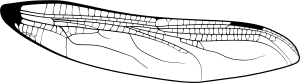
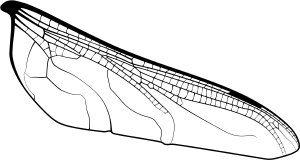
Zwei Vektorflügelbasen (obere und untere Flügel sind getrennt, sodass man sie drehen, anpassen und nach Bedarf zur Perspektive verstellen kann)

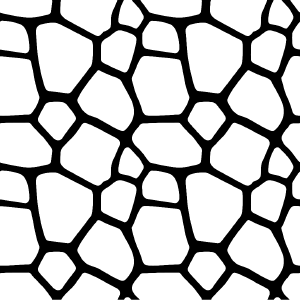
Ein nahtloser Libellenton, der die leeren Lücken mühelos füllt.

Zur Verfügung:
Sobald du mit den Flügelbasen zufrieden bist, fülle die leeren Stellen auf dem Bild. Wähle mit dem Zauberstabwerkzeug den gefüllten Bereich aus. Das ist nahezu automatisch, wenn du ein Referenz-Füllwerkzeug benutzt. ALTERNATIV kannst du den Bereich mit einem Lasso auswählen, den Bereich mit einem Zauberstab verwenden oder ein anderes Format auswählen. Für Comics finde ich, dass das Füllwerkzeug + Auswahl der genaueste und schnellste Weg ist.

Füge das Libellenmuster dem ausgewählten Bereich hinzu. Passen Sie die Klanggröße an, bis Sie zufrieden sind.
Füge hübsche Farben hinter dem Flügel hinzu, dann reduziere die Deckkraft oder ändere den Verblendmodus der Farben.

Du bist fertig!

Hier habe ich Opal-/Juwelfarben für die Flügel verwendet. Viel Spaß damit, Libellen sind wunderschön!
I made this set for a character in a mini comic I was working on in the past. I just realized the wing kit works for this asset challenge!
Included:
Two vector wing bases (Top and bottom wings are separated so you can rotate, adjust, skew them for perspective as needed)
A seamless dragonfly tone to fill the empty spaces easily.
To use:
Once you’re happy with the wing bases, fill the empty spaces pictured. Wand tool select the filled area. This is near automatic if you use a reference fill tool. ALTERNATIVELY, lasso select the area, reference wand tool the area, or any other format. For comics, I find fill tool + select is the most accurate and quick way.
Add the dragonfly pattern to the selected area. Adjust the size of the tone until you’re happy.
Add pretty colors behind the wing, then reduce opacity or change the blending mode of the colors.
You’re done!
Here, I used opal/jewel colors for the wings. Have fun with it, dragonflies are beautiful!
Flügel Wing
Protokoll aktualisieren
17. August 2026: Hinzugefügt Aug 17, 2026: Added







Weitere Materialien von Sneleste


Beliebte Materialien zu „Materialkatalog“


Neue Materialien




Abzeichen
-
 MVP ◆Dieser Nutzer hat einen großen Beitrag zur Verwaltung der Community geleistet, indem er viele großartige Antworten auf die gestellten Fragen veröffentlicht hat. Alle drei Monate werden die MVPs auf der Grundlage der in diesem Zeitraum erworbenen Punkte ermittelt und entsprechend anerkannt.
 -
 New Valuable Player (NVP) ◆Die NVP-Auszeichnung geht an die Nutzer, die nach den MVP den größten Beitrag zur Community geleistet haben. Sie werden basierend auf den gesammelten Punkten unter denjenigen ausgewählt, die bisher noch nicht als MVP ausgezeichnet wurden.
 -
 Offizielle Experten ◆Ausgewählt aus allen MVP-Preisträgern, die bereits ein Zeichen für Exzellenz sind, zeugt diese Auszeichnung von herausragender Korrespondenz in der Community. Nach sorgfältiger Prüfung werden sie von CELSYS ernannt und übernehmen ihre Position.* Vorherige Bezichnung: Evangelist
 -
 Offizieller Moderator von CELSYS ◆Moderatoren sind offizielle CELSYS-Mitarbeiter, die fließend Japanisch und verschiedene andere Sprachen sprechen. Moderatoren sind keine Experten der Software oder Illustrationen und können daher nicht direkt auf Ihre Fragen antworten. Aber Moderatoren bieten Unterstützung in Kommunikation und Sprache, um sicherzustellen, dass alle reibungslos miteinander kommunizieren können.
 -
 Offizieller Account von CELSYSDer offizielle Administrator-Account