




Ein sehr einfaches Setup, das auf dem Layout eines Freundes in einem anderen Programm basiert.
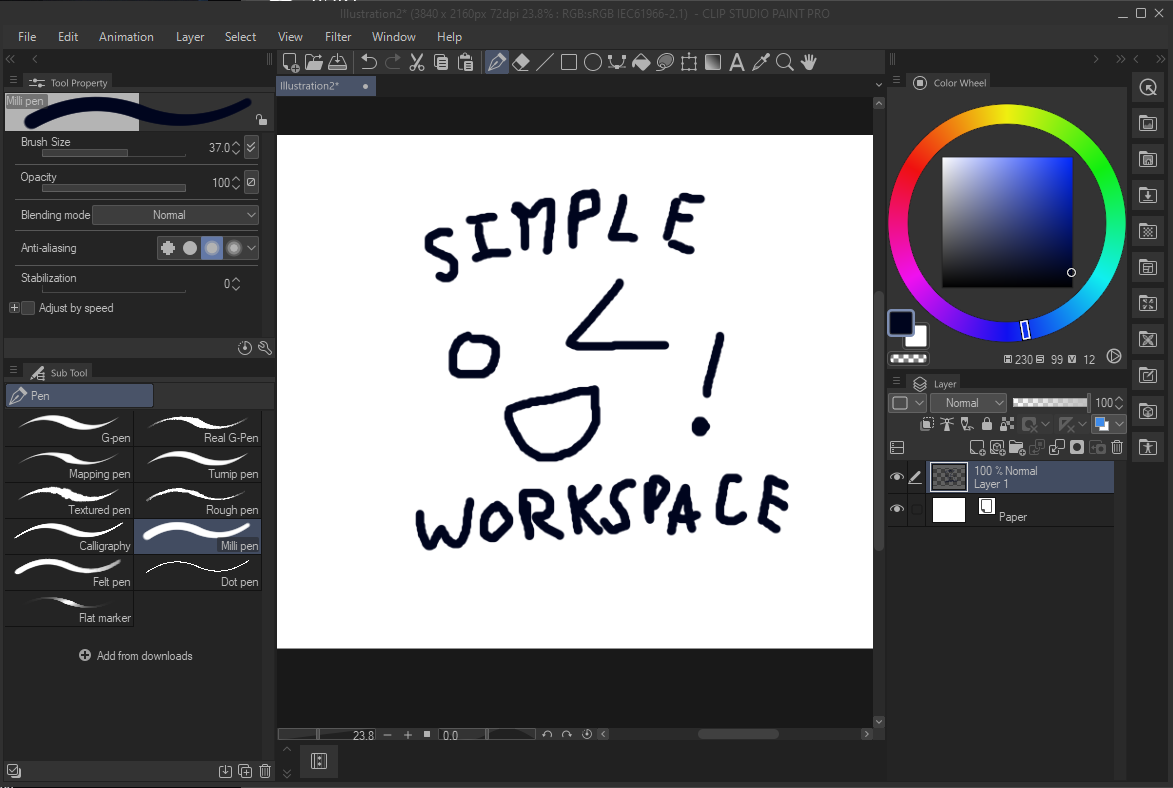
Das Layout im anderen Programm hatte die Symbolleiste oben auf dem Bildschirm. da es keine Möglichkeit gibt, die CSP-Symbolleiste horizontal oben auf dem Bildschirm zu befestigen, habe ich sie mit der Befehlsleiste neu erstellt. Um zusätzliche Verknüpfungen hinzuzufügen (zum Beispiel, wenn Sie Ihre Pinsel in mehrere separate Werkzeuge sortiert haben), klicken Sie mit der rechten Maustaste auf die Befehlsleiste, drücken Sie dann auf "Befehlsleisteen-Einstellungen" > "Menübefehle" > "Tools", und alles, was in der normalen Leiste zu finden wäre, kann hinzugefügt werden.
a very barebones setup based off of a friend's layout in another program.
the layout in the other program had the toolbar at the top of the screen. since there's no way to snap the CSP toolbar to the top of the screen horizontally, i recreated it using the command bar. in order to add additional shortcuts (for example, if you have your brushes sorted into multiple separate tools), right click the command bar, then press "command bar settings" -> "menu commands" -> "tools" and everything that would be on the normal toolbar is available to add.


Beliebte Materialien zu „Arbeitsbereich“


Neue Materialien


Abzeichen
-
 MVP ◆Dieser Nutzer hat einen großen Beitrag zur Verwaltung der Community geleistet, indem er viele großartige Antworten auf die gestellten Fragen veröffentlicht hat. Alle drei Monate werden die MVPs auf der Grundlage der in diesem Zeitraum erworbenen Punkte ermittelt und entsprechend anerkannt.
 -
 New Valuable Player (NVP) ◆Die NVP-Auszeichnung geht an die Nutzer, die nach den MVP den größten Beitrag zur Community geleistet haben. Sie werden basierend auf den gesammelten Punkten unter denjenigen ausgewählt, die bisher noch nicht als MVP ausgezeichnet wurden.
 -
 Offizielle Experten ◆Ausgewählt aus allen MVP-Preisträgern, die bereits ein Zeichen für Exzellenz sind, zeugt diese Auszeichnung von herausragender Korrespondenz in der Community. Nach sorgfältiger Prüfung werden sie von CELSYS ernannt und übernehmen ihre Position.* Vorherige Bezichnung: Evangelist
 -
 Offizieller Moderator von CELSYS ◆Moderatoren sind offizielle CELSYS-Mitarbeiter, die fließend Japanisch und verschiedene andere Sprachen sprechen. Moderatoren sind keine Experten der Software oder Illustrationen und können daher nicht direkt auf Ihre Fragen antworten. Aber Moderatoren bieten Unterstützung in Kommunikation und Sprache, um sicherzustellen, dass alle reibungslos miteinander kommunizieren können.
 -
 Offizieller Account von CELSYSDer offizielle Administrator-Account