



Ein Marker, um Wasserzeichen aus deinem Logo deiner Wahl zu machen! Ich habe das als Vorschlag gesehen, Lärm zu erzeugen, um KI zu stören, aber es funktioniert auch, um Proben zu schicken, die man nicht gestohlen haben möchte. A marker to make watermarks out of your logo of choice! Saw this as a suggestion to make noise to mess up AI, but also works for sending samples that you don't want stolen.
Ich habe das vor vielen Monden im Stream gezeigt und gesagt, ich würde ein Tutorial erstellen.


Ich habe es nie getan.
Jetzt schon, nehme ich an!
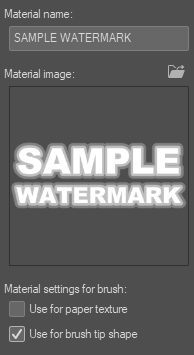
Das ist ein Marker, der Wasserzeichen macht! Die bereitgestellte Pinselform ist nur ein Muster und kann leicht durch Ihr Logo oder Ihre bevorzugte Form ausgetauscht werden.
Nimm einfach das Logo oder die Form, die du auf einer Ebene haben möchtest, ziehe es zu deinen Materialien und setze, wenn es dort ist, als Verwendung für die Pinselspitzenform.
Gehe in die Pinseleinstellungen und wähle unter Pinselspitze die Materialform aus, die du möchtest. Stellen Sie sicher, dass es ein leicht zu findender Name ist, wenn Sie viele Formen haben!

Danach einfach die ganze Leinwand mit dem Pinsel aufblasen, das sollte nicht allzu stark laggen oder so sein.

Dann stell es ein, dass es mit der Opazitätseinstellung deiner Wahl überlagert wird.

Und fertig! Du hast jetzt ein Bild mit Wasserzeichen ÜBERALL.
Ich weiß nicht, ob das gegen KI noch mithalten kann, aber jetzt ist dein Wasserzeichen überall drauf und kann je nach Logo oder Form interessante Texturen entstehen. Nur um ganz auf Nummer sicher zu gehen: Mein Wasserzeichen ist tatsächlich darauf zu sehen, und ich würde dasselbe empfehlen.

Ich hoffe, das hilft. Viel Spaß beim Kunstmachen!
I showed doing this on stream many moons ago and said I would make a tutorial.
I never did.
I am now I suppose!
This is a marker that makes watermarks! The provided brush shape is just a sample and can be swapped out easily with your logo or shape of choice.
Simply take the logo or shape you want on a layer, drag it over to your materials, and when it is in there, set as use for brush tip shape.
Go into the brush settings and under brush tip, select the material shape you would like. Make sure it is an easy name to find if you have a lot of shapes!
Afterwards, simply blast the whole canvas with the brush, shouldn't lag too bad or anything.
Then set to overlay with the opacity setting of your choice.
And done! You now have an image set with watermarks EVERYWHERE.
I do not know if this still holds up against AI, but it does now have your watermark all over it, and can make interesting textures depending on the logo or shape. Just to be extra safe, my watermark is actually on this, and I would suggest the same.
Hope this helps. Have a happy time making art!


Weitere Materialien von TheHamWarrior

Beliebte Materialien zu „Pinsel“





Neue Materialien





Abzeichen
-
 MVP ◆Dieser Nutzer hat einen großen Beitrag zur Verwaltung der Community geleistet, indem er viele großartige Antworten auf die gestellten Fragen veröffentlicht hat. Alle drei Monate werden die MVPs auf der Grundlage der in diesem Zeitraum erworbenen Punkte ermittelt und entsprechend anerkannt.
 -
 New Valuable Player (NVP) ◆Die NVP-Auszeichnung geht an die Nutzer, die nach den MVP den größten Beitrag zur Community geleistet haben. Sie werden basierend auf den gesammelten Punkten unter denjenigen ausgewählt, die bisher noch nicht als MVP ausgezeichnet wurden.
 -
 Offizielle Experten ◆Ausgewählt aus allen MVP-Preisträgern, die bereits ein Zeichen für Exzellenz sind, zeugt diese Auszeichnung von herausragender Korrespondenz in der Community. Nach sorgfältiger Prüfung werden sie von CELSYS ernannt und übernehmen ihre Position.* Vorherige Bezichnung: Evangelist
 -
 Offizieller Moderator von CELSYS ◆Moderatoren sind offizielle CELSYS-Mitarbeiter, die fließend Japanisch und verschiedene andere Sprachen sprechen. Moderatoren sind keine Experten der Software oder Illustrationen und können daher nicht direkt auf Ihre Fragen antworten. Aber Moderatoren bieten Unterstützung in Kommunikation und Sprache, um sicherzustellen, dass alle reibungslos miteinander kommunizieren können.
 -
 Offizieller Account von CELSYSDer offizielle Administrator-Account