



Ein Kiss Mark/Flecken-Pinsel von mir selbst <3 a kiss mark/stain brush by yours truly <3
Ein Küssmarkenbürstchen

Du kannst Farbe und Größe ändern
Du kannst mit den Einstellungen experimentieren, wenn du abenteuerlustig bist
:3
Erstellt von mir selbst
Murasaki_A
(einen Lippenabdruck auf einem Blatt Papier zu scannen und darauf zu achten, dass ich den Scanner nicht beflecke, war eine Qual)
(Entschuldigung für das etwas verschwommene Foto, der Pinsel ist tatsächlich ziemlich scharf, ich bin nur ein Dummkopf und bekomme das Foto nicht so unscharf dazu.)

um den Pinsel hinzuzufügen (natürlich nachdem du ihn heruntergeladen hast).
Du solltest zum unteren Rand des Tool-Gruppenpanels scrollen und auf 'Hinzufügen aus Downloads' klicken.

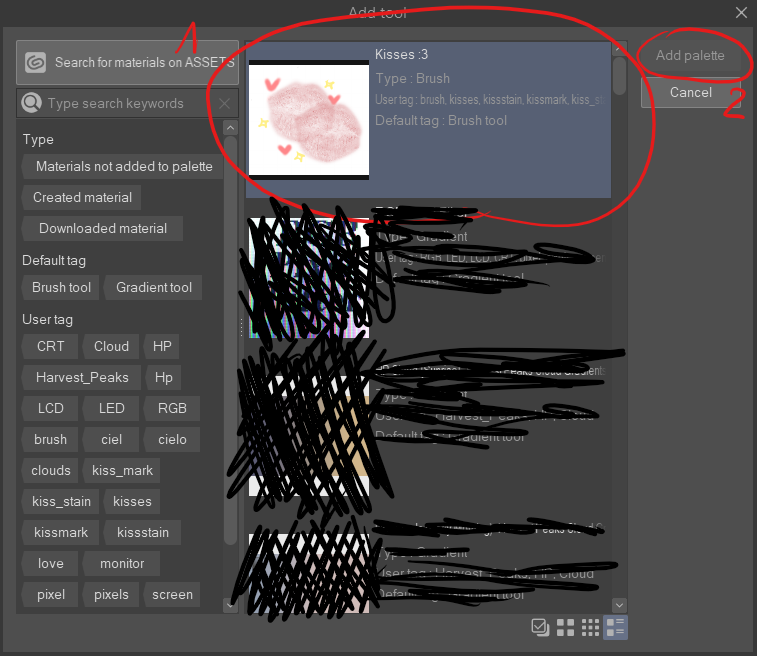
Dann erscheint ein Fenster namens 'Tool hinzufügen'
zuerst möchtest du sie finden und auf 'Küsse :3' klicken, danach klickst du auf 'Palette hinzufügen'-Button
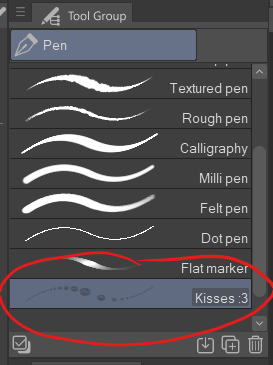
Danach sollte der Pinsel in dem Werkzeug erscheinen, das du beim Biggining ausgewählt hast
Viel Spaß beim Erstellen :3
a kiss mark brush
you can change it's colour and size
you can play around with the settings if you're feeling adventurous
:3
created by yours truly
Murasaki_A
(scanning a lipmark on a piece of paper and making sure that i don't stain the scanner was a pain in the ass)
(sorry for a bit blurry photo, the brush is actually quite sharp, it's just me who's a dumbass and can't get the photo to not get blurred so much)
to add the brush (after you download it of course)
you want to scroll to the bottom of the tool group panel and click 'add from downloads'
then a window called 'add tool' will pop up
first you want to find and click 'Kisses :3' after wich you click 'add palette' button
after that the brush should appear in the tool that you picked at the biggining
happy creating :3


Beliebte Materialien zu „Pinsel“


Neue Materialien





Abzeichen
-
 MVP ◆Dieser Nutzer hat einen großen Beitrag zur Verwaltung der Community geleistet, indem er viele großartige Antworten auf die gestellten Fragen veröffentlicht hat. Alle drei Monate werden die MVPs auf der Grundlage der in diesem Zeitraum erworbenen Punkte ermittelt und entsprechend anerkannt.
 -
 New Valuable Player (NVP) ◆Die NVP-Auszeichnung geht an die Nutzer, die nach den MVP den größten Beitrag zur Community geleistet haben. Sie werden basierend auf den gesammelten Punkten unter denjenigen ausgewählt, die bisher noch nicht als MVP ausgezeichnet wurden.
 -
 Offizielle Experten ◆Ausgewählt aus allen MVP-Preisträgern, die bereits ein Zeichen für Exzellenz sind, zeugt diese Auszeichnung von herausragender Korrespondenz in der Community. Nach sorgfältiger Prüfung werden sie von CELSYS ernannt und übernehmen ihre Position.* Vorherige Bezichnung: Evangelist
 -
 Offizieller Moderator von CELSYS ◆Moderatoren sind offizielle CELSYS-Mitarbeiter, die fließend Japanisch und verschiedene andere Sprachen sprechen. Moderatoren sind keine Experten der Software oder Illustrationen und können daher nicht direkt auf Ihre Fragen antworten. Aber Moderatoren bieten Unterstützung in Kommunikation und Sprache, um sicherzustellen, dass alle reibungslos miteinander kommunizieren können.
 -
 Offizieller Account von CELSYSDer offizielle Administrator-Account