



Das ist ein Foto, das ich gemacht und bearbeitet habe. Du kannst es zuschneiden oder anpassen, um es deinen Bedürfnissen anzupassen.


An
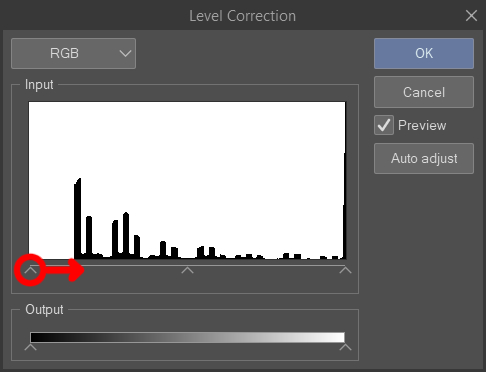
Ich habe das Beispiel B+W-Bild mit Ton erstellt, ich habe die Funktion "Pegelkorrektur" verwendet (Bearbeiten >
Tonale Korrektur > Pegelkorrektur), um die schwarzen Bereiche des Fotos zu machen
wirkt solider.
Dann habe ich die "Layer" verwendet
Property"-Funktion zur Anwendung des Tons (Punkteinstellungen = Rautt). Hier ist ein guter Leitfaden, falls du ihn brauchst
Hilfe: https://tips.clip-studio.com/en-us/articles/8344
Die linke Seite zeigt das Originalbild. Die rechte Seite zeigt das Bild nach den Anpassungen.
This is a photograph I took & edited. You can crop/resize it to fit your needs.
To
create the example B+W image with tone, I used the "level correction" function (Edit >
Tonal Correction > Level Correction) to make the black areas of the photo
appear more solid.
Then I used the "layer
property" function to apply tone (dot settings = lozenge). Here is a good guide if you need
help: https://tips.clip-studio.com/en-us/articles/8344
The left side shows the original image. The right side shows the image after adjustments.
Kategorie 1 Category 1







Weitere Materialien von caleana


Beliebte Materialien zu „Materialkatalog“


Neue Materialien


Abzeichen
-
 MVP ◆Dieser Nutzer hat einen großen Beitrag zur Verwaltung der Community geleistet, indem er viele großartige Antworten auf die gestellten Fragen veröffentlicht hat. Alle drei Monate werden die MVPs auf der Grundlage der in diesem Zeitraum erworbenen Punkte ermittelt und entsprechend anerkannt.
 -
 New Valuable Player (NVP) ◆Die NVP-Auszeichnung geht an die Nutzer, die nach den MVP den größten Beitrag zur Community geleistet haben. Sie werden basierend auf den gesammelten Punkten unter denjenigen ausgewählt, die bisher noch nicht als MVP ausgezeichnet wurden.
 -
 Offizielle Experten ◆Ausgewählt aus allen MVP-Preisträgern, die bereits ein Zeichen für Exzellenz sind, zeugt diese Auszeichnung von herausragender Korrespondenz in der Community. Nach sorgfältiger Prüfung werden sie von CELSYS ernannt und übernehmen ihre Position.* Vorherige Bezichnung: Evangelist
 -
 Offizieller Moderator von CELSYS ◆Moderatoren sind offizielle CELSYS-Mitarbeiter, die fließend Japanisch und verschiedene andere Sprachen sprechen. Moderatoren sind keine Experten der Software oder Illustrationen und können daher nicht direkt auf Ihre Fragen antworten. Aber Moderatoren bieten Unterstützung in Kommunikation und Sprache, um sicherzustellen, dass alle reibungslos miteinander kommunizieren können.
 -
 Offizieller Account von CELSYSDer offizielle Administrator-Account