



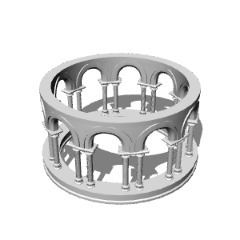
Ein einfaches Modell eines Pavillons mit Säulen.
Hergestellt mit Blender.
A simple model of a gazebo with pillars.
Made with Blender.
Die Modelle sollten im Download-Tab verfügbar sein, danach können sie auf die Leinwand geleitet werden.
Das Modell sollte in Clip Studio Paint so aussehen:


Um die Grundstruktur zu bauen, wählen Sie alle drei Modelle gleichzeitig im Download- oder 3D-Tab aus und ziehen Sie sie auf die Leinwand. Dann verwende entweder die Pfeile oder Koordinaten, um sie übereinander zu stapeln:

Du könntest das Segmentstück auch mehrfach stapeln, um eine höhere Struktur zu schaffen (wobei du bedenke, dass eine Erhöhung der Polygonanzahl die Leistung beeinträchtigen könnte):


The models should be available in the downloads tab, after which they can be directed onto the canvas.
The model should look like this in Clip Studio paint:
To build the basic structure, select all three models simultaneously in the downloads or 3-D tab, and drag them onto the canvas. Then, use either the arrows or coordinates to stack them on top of each other:
You could also stack the segment piece multiple times to create a taller structure (though be aware that increasing the amount polygons could affect performance):
Kategorie 1 Category 1









Weitere Materialien von aBookshelf


Beliebte Materialien zu „Materialkatalog“


Neue Materialien





Abzeichen
-
 MVP ◆Dieser Nutzer hat einen großen Beitrag zur Verwaltung der Community geleistet, indem er viele großartige Antworten auf die gestellten Fragen veröffentlicht hat. Alle drei Monate werden die MVPs auf der Grundlage der in diesem Zeitraum erworbenen Punkte ermittelt und entsprechend anerkannt.
 -
 New Valuable Player (NVP) ◆Die NVP-Auszeichnung geht an die Nutzer, die nach den MVP den größten Beitrag zur Community geleistet haben. Sie werden basierend auf den gesammelten Punkten unter denjenigen ausgewählt, die bisher noch nicht als MVP ausgezeichnet wurden.
 -
 Offizielle Experten ◆Ausgewählt aus allen MVP-Preisträgern, die bereits ein Zeichen für Exzellenz sind, zeugt diese Auszeichnung von herausragender Korrespondenz in der Community. Nach sorgfältiger Prüfung werden sie von CELSYS ernannt und übernehmen ihre Position.* Vorherige Bezichnung: Evangelist
 -
 Offizieller Moderator von CELSYS ◆Moderatoren sind offizielle CELSYS-Mitarbeiter, die fließend Japanisch und verschiedene andere Sprachen sprechen. Moderatoren sind keine Experten der Software oder Illustrationen und können daher nicht direkt auf Ihre Fragen antworten. Aber Moderatoren bieten Unterstützung in Kommunikation und Sprache, um sicherzustellen, dass alle reibungslos miteinander kommunizieren können.
 -
 Offizieller Account von CELSYSDer offizielle Administrator-Account