


[KOSTENLOS] 5_FRAMES VORLAGE / COMICSTREIFEN ([FREE] 5_FRAMES TEMPLATE / COMIC STRIPE) [FREE] 5_FRAMES TEMPLATE / COMIC STRIPE
Content ID:2239975
-
1.131


Rahmenvorlage mit getrennten Ordnern und Ebenen für Bequemlichkeit, einfache Bedienung für Comicstreifen oder Kompositionen. Framing Template with folders and layers separated for convenience, easy use for Comic Stripes or Compositions.
Framing Template mit getrennten Ordnern und Ebenen für Bequemlichkeit und einfache Bedienung. [für Comicstreifen oder Kompositionen]
*(AKTUALISIERT wegen der Beitragsrichtlinien)
1. Wählen Sie Ihr Canvas-Projekt aus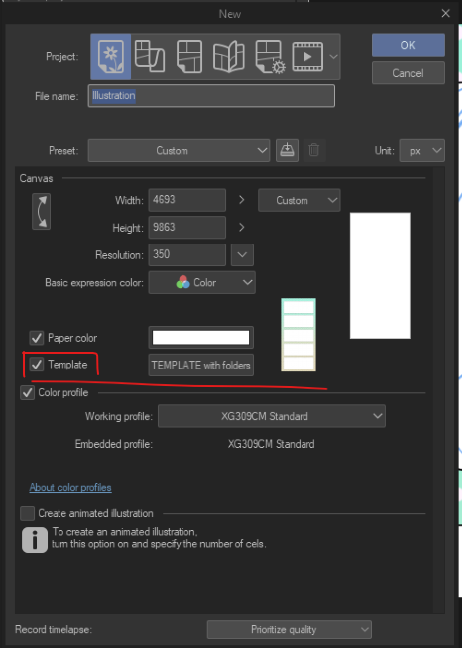
Prüfe in "Vorlage", ob deine markiert ist, falls ja, dann suche weiter.
2. Suche nach "5_frames"-Tag oder "Vorlage".
3. Es gibt 5 Rahmen, und jeder von ihnen hat seine jeweiligen Ordner mit Empfehlungen.
Jeder Ordner hat den Rahmen und den Rahmenrahmen, den Rahmenhintergrund und einen Ordner für Lineart.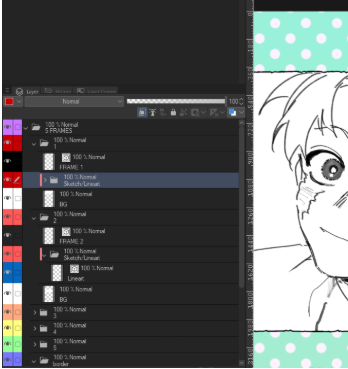
4. Im letzten Ordner (dem lila) kannst du in die jeweilige Gradient Map-Ebene gehen und die Hintergrundfarben nach deinem Geschmack ändern.
>>Haftungsausschluss: Falls du den vorherigen bereits heruntergeladen hast, entschuldige ich die Unannehmlichkeiten... Sie werden jetzt wegen der Posting-Richtlinien gelöscht. Also habe ich es überarbeitet und poste es erneut, ich bin mir nicht sicher, ob der Moderator das auch entfernt (aus welchem Grund auch immer), aber ich BESITZE diese Kunst unten. Wenn sie also nochmal entfernt werden, tut es mir leid :(( ich hoffe wirklich, dass sie es nicht tun.<<<
**Beispiele, wie du sie nutzen kannst**


>>Du kannst es für Compositions Studies, Fun Comics, Stripes oder was auch immer du möchtest, verwenden.
Vielleicht fehlt es mir, aber ich hoffe, es gefällt dir und es kann dir auch helfen. :) <<
Vielleicht fehlt es mir, aber ich hoffe, es gefällt dir und es kann dir auch helfen. :) <<
Framing Template with folders and layers separated for convenience and easy use. [For Comic Stripes or Compositions]
*(UPDATED because of posting guidelines)
1. Select your Canvas Project
In "Template" check if yours is marked, if so then proceed to search.
2. Search for "5_frames"tag or "template".
3. There are 5 frames and each of them have their respective folders with colors.
Each folder has the frame border, the frame background and a folder for Lineart.
4. In the last folder (the purple one) you can go in the respective Gradient Map layer and change the background colors to your liking.
>>Disclaimer: If tou already download the previous one, Im sorry for the inconvenience... they are deleted now because of posting guidelines. So I revised and im reposting it again, im not sure if the moderator will take this one down too (for whatever reason) but I OWN these arts below. So if they take down again, I'm sorry :(( I really hope they won't.<<<
**Examples of how you can use**
>>You can Use it for Compositions Studies, Fun Comics Stripes or whatever you feel like it.
I may be lacking, but I hope you like it and it can be helpful to you as well. :) <<
I may be lacking, but I hope you like it and it can be helpful to you as well. :) <<





Weitere Materialien von Rainmoonade

Beliebte Materialien zu „Ebenenvorlage“


Neue Materialien


Abzeichen
-
 MVP ◆Dieser Nutzer hat einen großen Beitrag zur Verwaltung der Community geleistet, indem er viele großartige Antworten auf die gestellten Fragen veröffentlicht hat. Alle drei Monate werden die MVPs auf der Grundlage der in diesem Zeitraum erworbenen Punkte ermittelt und entsprechend anerkannt.
 -
 New Valuable Player (NVP) ◆Die NVP-Auszeichnung geht an die Nutzer, die nach den MVP den größten Beitrag zur Community geleistet haben. Sie werden basierend auf den gesammelten Punkten unter denjenigen ausgewählt, die bisher noch nicht als MVP ausgezeichnet wurden.
 -
 Offizielle Experten ◆Ausgewählt aus allen MVP-Preisträgern, die bereits ein Zeichen für Exzellenz sind, zeugt diese Auszeichnung von herausragender Korrespondenz in der Community. Nach sorgfältiger Prüfung werden sie von CELSYS ernannt und übernehmen ihre Position.* Vorherige Bezichnung: Evangelist
 -
 Offizieller Moderator von CELSYS ◆Moderatoren sind offizielle CELSYS-Mitarbeiter, die fließend Japanisch und verschiedene andere Sprachen sprechen. Moderatoren sind keine Experten der Software oder Illustrationen und können daher nicht direkt auf Ihre Fragen antworten. Aber Moderatoren bieten Unterstützung in Kommunikation und Sprache, um sicherzustellen, dass alle reibungslos miteinander kommunizieren können.
 -
 Offizieller Account von CELSYSDer offizielle Administrator-Account